If you're building a Shopify application, custom storefront, private integration, or headless ecommerce website, you'll eventually come across two important Shopify APIs: Admin API and Storefront API.
Both APIs allow developers to work with Shopify data, but they are designed for very different purposes.
Choosing the wrong API can lead to authentication problems, missing permissions, unnecessary complexity, or an architecture that doesn't match what your application actually needs.
In this guide, we'll explain the difference between the Shopify Admin API vs Storefront API, what each API can access, when to use each one, how authentication differs, and how they fit into traditional Shopify stores, custom apps, and headless Shopify projects.
Why Shopify Store Speed Matters
Quick Difference Between Shopify Admin API and Storefront APIThe simplest way to understand the difference is:
Admin API
    ↓
Manage Shopify store data

Storefront API
    ↓
Build the customer-facing shopping experience
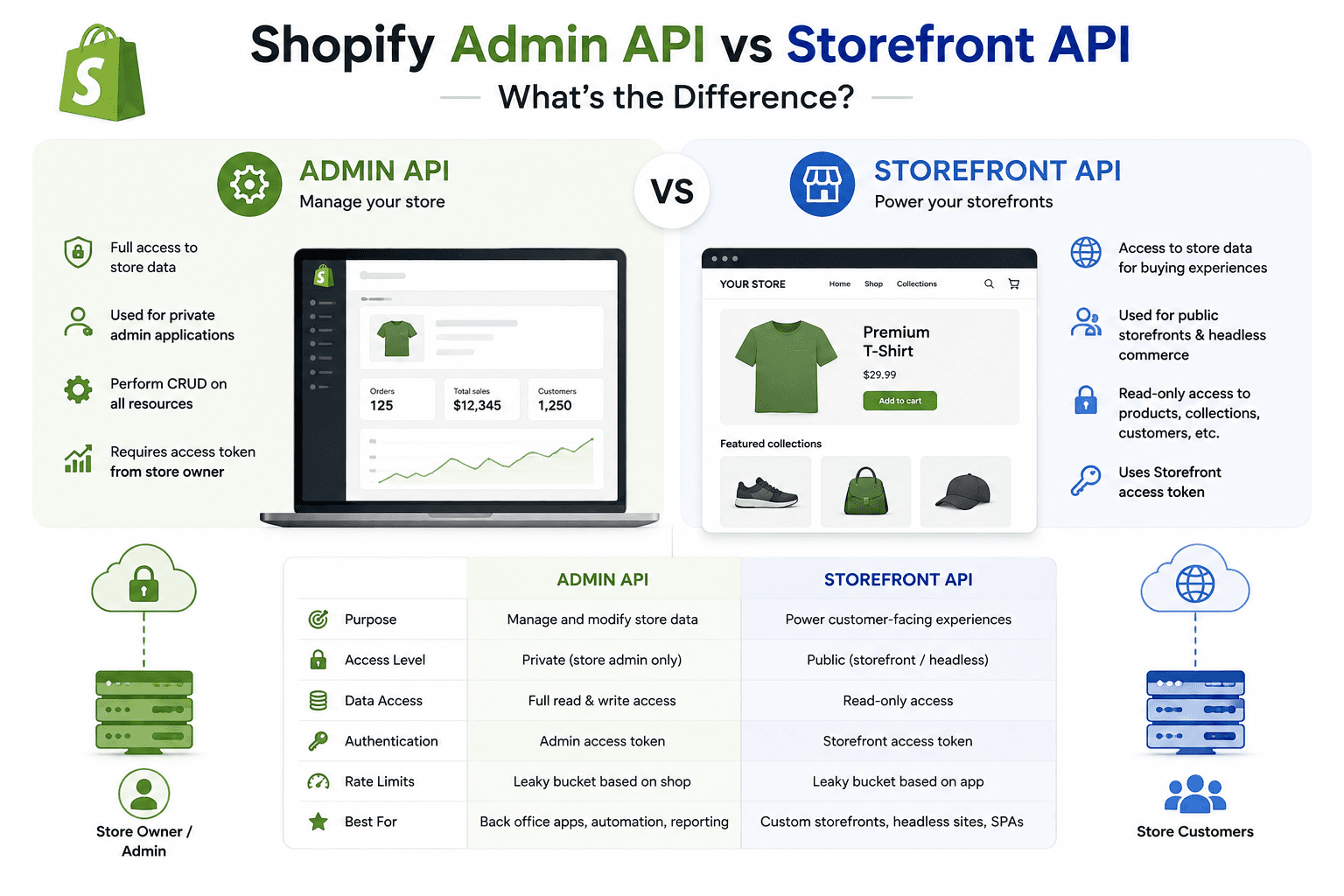
The Admin API is designed for administrative and backend operations, while the Storefront API is designed to power customer-facing storefront experiences.
Why Shopify Store Speed Matters
Shopify Admin API vs Storefront API| Feature | Admin API | Storefront API |
|---|---|---|
| Primary purpose | Store management and backend operations | Customer-facing storefronts |
| Typical users | Apps and backend systems | Storefront developers |
| Products | Manage products | Read and display products |
| Orders | Administrative order operations | Customer shopping workflows |
| Customers | Customer management capabilities | Customer-facing functionality with applicable access |
| Authentication | Admin authentication and permissions | Storefront access token |
| Typical architecture | Backend / app server | Frontend / headless storefront |
Why Shopify Store Speed Matters
What Is the Shopify Admin API?The Shopify Admin API allows applications to interact with Shopify store data and administrative functionality.
Developers commonly use it when building:
- Shopify apps
- Backend integrations
- Inventory systems
- Order management systems
- ERP integrations
- Warehouse integrations
- Reporting systems
- Automation tools
- Custom business applications
In other words, when your application needs to perform store management operations, the Admin API is usually the API you should investigate first.
Why Shopify Store Speed Matters
What Can You Do With the Shopify Admin API?Depending on the API version, permissions, and available resources, applications can work with many areas of Shopify administration.
Common examples include:
- Products
- Inventory
- Orders
- Customers
- Collections
- Metafields
- Locations
- Fulfillment-related data
- Shop information
The exact capabilities available to an application depend on the API version and the access scopes granted to that application.
Why Shopify Store Speed Matters
Shopify Admin API ExampleSuppose you're building an inventory management application.
Your backend might need to retrieve product and inventory information from Shopify.
Your Application
       ↓
Backend Server
       ↓
Shopify Admin API
       ↓
Shopify Store
The backend can then process the Shopify data and store or synchronize the information with your own database.
Why Shopify Store Speed Matters
What Is the Shopify Storefront API?The Shopify Storefront API is designed to allow developers to build custom customer-facing shopping experiences.
It is particularly useful for:
- Headless Shopify
- Next.js storefronts
- React storefronts
- Custom mobile shopping experiences
- Custom product pages
- Custom collection experiences
- Custom carts
Instead of using Shopify's standard Online Store theme as the entire frontend, a developer can build a custom frontend that communicates with Shopify through the Storefront API.
Why Shopify Store Speed Matters
What Can You Do With the Storefront API?The Storefront API provides access to data and operations needed to create a shopping experience.
Common use cases include:
- Displaying products
- Displaying collections
- Displaying product variants
- Working with product images
- Creating shopping experiences
- Managing cart interactions
- Working with selling plans where supported
- Building custom storefronts
Why Shopify Store Speed Matters
Storefront API ExampleImagine you're building a headless Shopify store using Next.js.
Next.js Frontend
       ↓
Storefront API
       ↓
Shopify
       ↓
Products / Collections / Cart
The frontend can request the information required to render the customer-facing experience.
Why Shopify Store Speed Matters
Why Does Shopify Have Two APIs?Because backend administration and customer-facing commerce are different problems.
Consider an ecommerce application.
ADMIN SIDE

Products
Orders
Inventory
Customers
Settings
Fulfillment
       ↓
Admin API


CUSTOMER SIDE

Products
Collections
Cart
Shopping Experience
       ↓
Storefront API
Separating these responsibilities also helps protect sensitive administrative data from being exposed directly to storefront clients.
Why Shopify Store Speed Matters
Admin API vs Storefront API: The Main ConceptThink of Shopify as a store with two different doors.
        SHOPIFY
           │
     ┌─────┴─────┐
     │           │
 ADMIN API   STOREFRONT API
     │           │
 Backend      Frontend
     │           │
 Store Mgmt   Shopping
 Operations   Experience
The Admin API is primarily concerned with managing the store.
The Storefront API is primarily concerned with presenting the store to customers.
Why Shopify Store Speed Matters
Admin API AuthenticationAdmin API access requires appropriate authentication and permissions.
Shopify apps request access scopes that determine what store data they can access.
Examples of permissions can relate to resources such as:
- Products
- Orders
- Customers
- Inventory
The exact permissions available depend on the Shopify API and app requirements.
Why Shopify Store Speed Matters
Storefront API AuthenticationStorefront API requests use Storefront API access credentials appropriate for the storefront use case.
Because the Storefront API is intended for customer-facing applications, its access model is designed differently from the administrative API.
You should never expose administrative credentials in browser-side code.
Why Shopify Store Speed Matters
Never Expose Admin API Credentials in the FrontendThis is one of the most important rules for Shopify developers.
Do not place sensitive Admin API credentials directly inside:
- React components
- Next.js client components
- Browser JavaScript
- Public Git repositories
- HTML source
Administrative API credentials belong in a secure server-side environment.
Why Shopify Store Speed Matters
Can You Use Admin API From a Browser?You should not expose sensitive Admin API credentials in browser code simply to make API requests easier.
If a customer-facing application needs information from the Admin API, the safer architecture is generally:
Browser
   ↓
Your Backend
   ↓
Admin API
   ↓
Shopify
Your backend controls authentication, permissions, validation, and the data that is returned to the client.
Why Shopify Store Speed Matters
Can You Use Storefront API From the Browser?The Storefront API is designed for customer-facing storefront applications, including frontend applications.
However, you should still understand exactly what data your storefront application is exposing and follow Shopify's current authentication and security requirements.
Why Shopify Store Speed Matters
REST API vs GraphQL APIShopify provides API capabilities through different interfaces and has increasingly emphasized GraphQL for modern development.
When working with Shopify APIs, developers should understand the difference between:
- Admin GraphQL API
- Admin REST API
- Storefront GraphQL API
The exact availability and recommended approach can change as Shopify evolves its platform, so always check the current Shopify API documentation for the API version you're targeting.
Why Shopify Store Speed Matters
Shopify Admin GraphQL APIThe Admin GraphQL API allows applications to query and mutate administrative Shopify data using GraphQL.
GraphQL can be particularly useful when your application needs specific fields from complex resources.
For example, instead of retrieving an unnecessarily large response, you can request the fields your application actually needs.
Why Shopify Store Speed Matters
Shopify Storefront GraphQL APIThe Storefront API is primarily exposed through GraphQL and is designed for custom storefront experiences.
A headless frontend can use GraphQL queries to request products, collections, variants, and other storefront information.
Why Shopify Store Speed Matters
Admin API Example ArchitectureSuppose you're building a Shopify inventory dashboard.
React Dashboard
       ↓
Node.js / Express Backend
       ↓
Shopify Admin API
       ↓
Products
Inventory
Orders
Locations
The backend can synchronize Shopify data with your own database.
Why Shopify Store Speed Matters
Storefront API Example ArchitectureNow imagine you're building a headless ecommerce website with Next.js.
Next.js
   ↓
Storefront API
   ↓
Shopify
   ↓
Products
Collections
Cart
The frontend is responsible for rendering the customer experience, while Shopify remains the commerce backend.
Why Shopify Store Speed Matters
Using Both APIs in One ProjectYou don't always have to choose only one API.
A sophisticated Shopify application can use both.
                    Shopify
                       │
             ┌─────────┴─────────┐
             │                   │
         Admin API          Storefront API
             │                   │
          Backend             Frontend
             │                   │
      Store Management       Shopping
      Synchronization        Experience
This architecture is common in larger headless and integration projects.
Why Shopify Store Speed Matters
Example: Headless Shopify With Next.jsSuppose you're building a custom Next.js storefront.
The frontend needs to:
- Display products
- Display collections
- Show product variants
- Create and update carts
- Build a custom shopping experience
The Storefront API is the natural API to investigate for these customer-facing operations.
Meanwhile, your backend might use the Admin API for:
- Inventory synchronization
- Product management
- Order processing workflows
- Administrative integrations
Why Shopify Store Speed Matters
Admin API vs Storefront API for ProductsBoth APIs can work with product-related information, but their purpose is different.
The Admin API is designed around administrative product management.
The Storefront API is designed around presenting products to customers.
Admin API

Create
Update
Manage
Synchronize
       ↓
Product


Storefront API

Read
Display
Browse
Shop
       ↓
Product
Why Shopify Store Speed Matters
Admin API vs Storefront API for OrdersOrders are primarily an administrative concern, so applications performing backend order management generally use the Admin API with the appropriate access.
The customer-facing shopping experience, however, involves storefront concepts such as carts and checkout flows.
Why Shopify Store Speed Matters
Admin API vs Storefront API for InventoryInventory management is primarily an administrative operation.
If you're building an inventory synchronization system, warehouse application, or ERP integration, the Admin API is generally the API you'll investigate.
Why Shopify Store Speed Matters
Admin API vs Storefront API for CollectionsCollections can be managed through administrative functionality and displayed through storefront functionality.
Therefore, the correct API depends on what your application is trying to accomplish.
Why Shopify Store Speed Matters
Admin API vs Storefront API for MetafieldsMetafields are another good example of why API choice depends on the operation.
A backend application may need administrative access to create or manage metafields.
A storefront may need access to appropriate metafield information to display custom content.
Why Shopify Store Speed Matters
When Should You Use the Shopify Admin API?Use the Admin API when your application needs to perform administrative or backend operations.
Typical examples include:
- Shopify app development
- Product synchronization
- Inventory management
- Order integrations
- ERP systems
- Warehouse systems
- Backend automation
- Reporting applications
- Data synchronization
Why Shopify Store Speed Matters
When Should You Use the Storefront API?Use the Storefront API when you're building a customer-facing shopping experience outside the standard Shopify theme architecture.
Common examples include:
- Headless Shopify
- Next.js storefronts
- React storefronts
- Custom ecommerce websites
- Mobile shopping applications
- Custom product experiences
Why Shopify Store Speed Matters
When Should You Use Both APIs?Use both APIs when your application has both administrative and customer-facing responsibilities.
For example:
Customer
   ↓
Next.js Storefront
   ↓
Storefront API
   ↓
Shopify


Store Manager
   ↓
Admin Dashboard
   ↓
Your Backend
   ↓
Admin API
   ↓
Shopify
Why Shopify Store Speed Matters
Shopify API Security Best PracticesAPI security is especially important when building Shopify integrations.
1. Keep Admin Credentials Server-Side
Never expose sensitive administrative credentials in browser code.
2. Request Only Required Permissions
Your application should request the access required for its actual functionality.
3. Validate User Input
Don't pass unvalidated customer input directly into backend operations.
4. Protect Your Backend
Authentication, authorization, rate limiting, logging, and secure environment configuration are important for backend integrations.
5. Don't Commit Secrets to Git
API credentials should not be committed to public repositories.
Why Shopify Store Speed Matters
Common Shopify API Mistakes- Using the wrong API for the job
- Exposing Admin API credentials
- Requesting unnecessary permissions
- Ignoring API versioning
- Building everything directly in the browser
- Using Admin API for simple storefront operations
- Using Storefront API for administrative operations
- Ignoring error handling
- Not planning for rate limits
- Not validating API responses
Why Shopify Store Speed Matters
Shopify API Decision GuideWhen you're unsure which API to use, ask one question:
What is my application trying to do?If the answer is:
"Manage the Shopify store"

        ↓

Use the Admin API
If the answer is:
"Build the customer shopping experience"

        ↓

Use the Storefront API
If the answer is both:
Backend
   ↓
Admin API

Frontend
   ↓
Storefront API
Why Shopify Store Speed Matters
Admin API vs Storefront API for a Shopify AppIf you're developing a Shopify app that needs to manage merchant data, the Admin API will usually be central to your architecture.
If your app also provides a custom customer-facing experience, you may additionally need Storefront API functionality.
Always design your permissions and architecture around the actual functionality rather than assuming one API can safely perform every operation.
Why Shopify Store Speed Matters
Admin API vs Storefront API for Headless ShopifyHeadless Shopify projects commonly separate the commerce backend from the presentation layer.
Next.js
React
Custom Frontend
      │
      ↓
Storefront API
      │
      ↓
Shopify


Backend Services
      │
      ↓
Admin API
      │
      ↓
Shopify
This separation gives developers more control over the frontend while Shopify continues to provide commerce functionality.
For more information about this architecture, see:
Headless Shopify: Why Use Next.js for Your Storefront
Why Shopify Store Speed Matters
Admin API vs Storefront API: Which One Should You Learn First?If you're learning Shopify app development, start with the Admin API because it is fundamental to many Shopify application and integration scenarios.
If you're primarily interested in headless frontend development, learn the Storefront API alongside Shopify's storefront concepts.
If you want to become a full-stack Shopify developer, eventually understanding both APIs is highly valuable.
Why Shopify Store Speed Matters
Frequently Asked QuestionsWhat is the difference between Shopify Admin API and Storefront API?
The Admin API is primarily used for administrative and backend operations on a Shopify store, while the Storefront API is designed for building customer-facing shopping experiences and custom storefronts.
Can I use the Admin API for a headless Shopify website?
A headless architecture may use the Admin API for backend or administrative operations, but customer-facing storefront functionality is generally handled through the Storefront API or other appropriate Shopify storefront mechanisms. Sensitive Admin API credentials should remain server-side.
Can I use Storefront API to manage Shopify products?
The Storefront API is intended for customer-facing product experiences rather than general administrative product management. If your application needs to create, update, or manage products, investigate the Admin API and its required permissions.
Which Shopify API is used for inventory management?
Inventory management is an administrative operation, so applications that need to manage or synchronize inventory generally use the Admin API with the appropriate access.
Which Shopify API should I use with Next.js?
It depends on what your Next.js application is doing. A customer-facing headless storefront commonly uses the Storefront API, while server-side administrative integrations can use the Admin API.
Can I use Admin API and Storefront API together?
Yes. A larger application can use the Storefront API for its customer-facing frontend and the Admin API for backend administrative operations.
Is Shopify Storefront API only for headless stores?
The Storefront API is particularly useful for headless storefronts, but its broader purpose is providing programmatic access to customer-facing commerce experiences.
Is Shopify Admin API secure?
The security of an Admin API integration depends on how the application handles authentication, access scopes, credentials, backend architecture, and user input. Sensitive credentials should be protected and kept out of client-side code.
Why Shopify Store Speed Matters
Final ThoughtsShopify Admin API and Storefront API solve different problems.
The Admin API is primarily about managing and integrating with the Shopify store from an administrative or backend perspective.
The Storefront API is primarily about creating customer-facing shopping experiences.
A simple way to remember the difference is:
Admin API
=
Manage the store

Storefront API
=
Build the shopping experience
If you're building an inventory system, ERP integration, Shopify app, or backend automation, start by investigating the Admin API.
If you're building a headless Shopify website with Next.js, React, or another frontend framework, the Storefront API will often be an important part of your architecture.
And for larger applications, you may use both APIs together: Storefront API for the customer experience and Admin API for backend operations.
Once you understand this separation, Shopify API architecture becomes much easier to reason about.