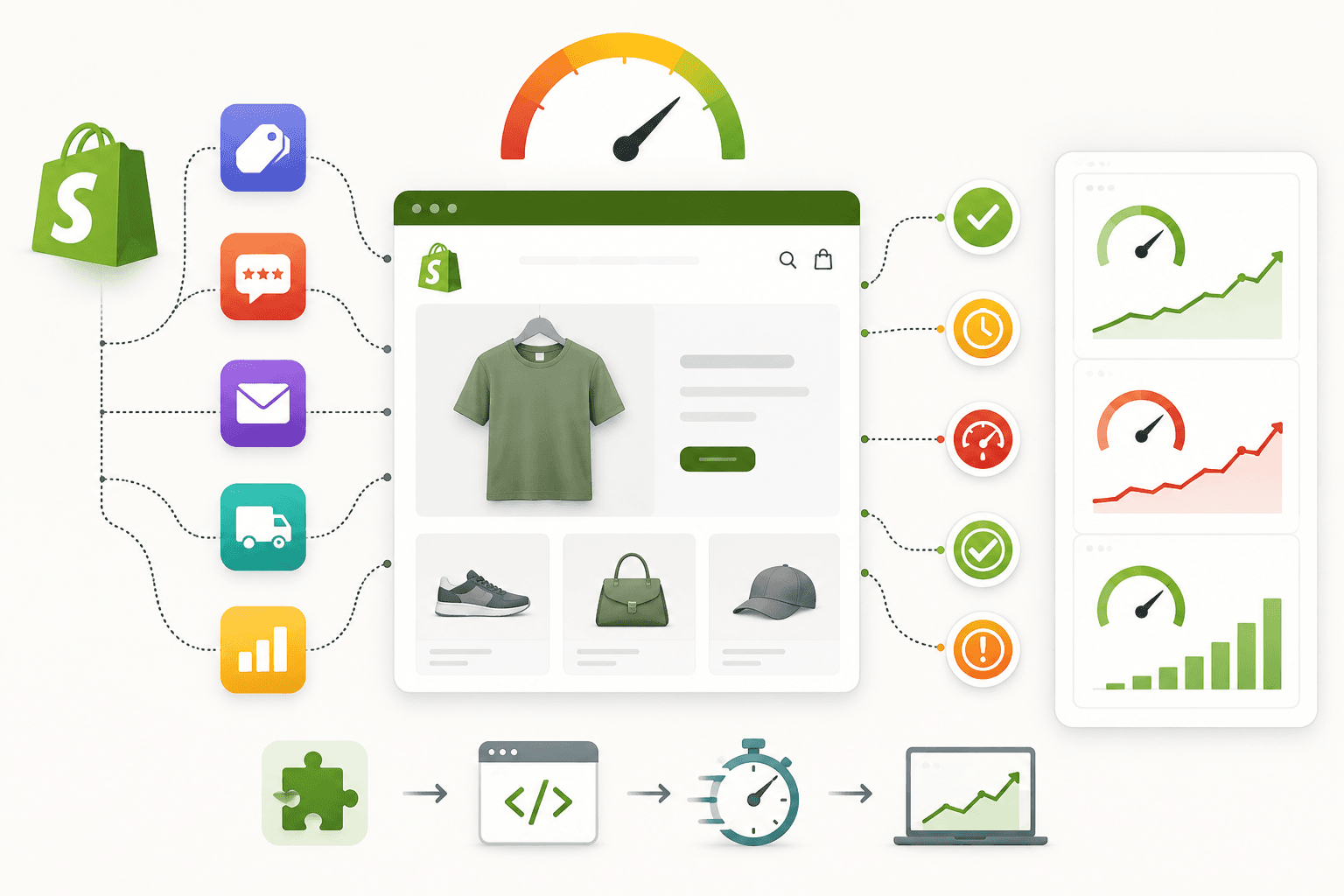
Shopify apps make it possible to add powerful features to an ecommerce store without building everything from scratch.
Reviews, wishlists, subscriptions, analytics, product recommendations, customer support, marketing automation, search, filters, and many other features can be added through apps.
However, there is an important trade-off that Shopify store owners should understand: third-party apps can affect storefront performance.
An app may add JavaScript, CSS, images, widgets, network requests, tracking scripts, or additional functionality to your storefront. One app may have a small impact, but many apps working together can make a store significantly more complex.
In this guide, we'll explain how Shopify apps can affect website speed, what types of app resources to look for, how to identify performance-heavy apps, how app embeds work, what to check before uninstalling an app, and how to build a faster Shopify store without removing useful functionality.
Why Shopify Store Speed Matters
Do Shopify Apps Slow Down Your Website?Shopify apps can affect storefront performance, but it is not accurate to say that every Shopify app automatically makes a website slow.
The actual impact depends on:
- What the app does
- How much JavaScript it loads
- How much CSS it loads
- How many network requests it creates
- Where its code runs
- Whether it loads on every page
- Whether it loads before or after important content
- How efficiently the app is implemented
Therefore, don't judge an app simply by its category or size. Measure its actual impact on your store.
Why Shopify Store Speed Matters
How Shopify Apps Can Affect PerformanceA third-party app can potentially add several types of resources to your storefront.
Shopify Store
    ↓
Theme
    ↓
App Scripts
    ↓
App CSS
    ↓
Widgets
    ↓
External Requests
    ↓
Tracking / APIs
Each additional resource can introduce more work for the browser or additional network activity.
Why Shopify Store Speed Matters
Common App Resources That Affect Speed- JavaScript files
- CSS files
- Images
- Fonts
- API requests
- Analytics scripts
- Tracking pixels
- Embedded widgets
- Third-party iframes
Why Shopify Store Speed Matters
1. JavaScript Added by Shopify AppsJavaScript is one of the most important things to investigate when an app affects storefront performance.
Browser JavaScript can require work to:
- Download
- Parse
- Compile
- Execute
- Respond to user interactions
Heavy JavaScript can become especially noticeable on mobile devices with limited processing resources.
Why Shopify Store Speed Matters
2. App CSS Can Increase Page ComplexitySome apps also add CSS to your storefront.
CSS isn't automatically a performance problem, but large or unnecessary stylesheets can increase the amount of data the browser needs to download and process.
Review whether app styles are being loaded on pages where the app isn't actually being used.
Why Shopify Store Speed Matters
3. Third-Party Network RequestsApps may communicate with external servers to load data or functionality.
For example:
Browser
   ↓
Shopify Store
   ↓
Third-Party App Server
   ↓
Response
   ↓
Widget appears
Every additional external dependency can introduce network activity that needs to be considered during a performance audit.
Why Shopify Store Speed Matters
4. App Widgets Can Add Visible ContentReview widgets, chat boxes, recommendation sections, popups, and other app components can add visible elements to your page.
Examples include:
- Review stars
- Review carousels
- Chat widgets
- Product recommendations
- Countdown timers
- Wishlist buttons
- Recently viewed products
These features may be valuable, but they should be evaluated against their performance cost.
Why Shopify Store Speed Matters
5. Apps That Load on Every PageOne of the biggest things to check is whether an app loads globally.
Imagine an app is only needed on product pages but its JavaScript loads on:
Homepage
Collection
Product
Blog
Contact
About
Cart
Visitors who never interact with the app may still download some of its resources.
If your implementation allows more targeted loading, consider limiting functionality to the pages where it is actually needed.
Why Shopify Store Speed Matters
6. App Embeds and Shopify ThemesShopify provides app embed functionality that allows apps to integrate with themes without requiring developers to manually place every piece of code in theme files.
App embeds can be useful because they make integrations easier to manage.
However, enabled app embeds should still be reviewed during a performance audit.
Why Shopify Store Speed Matters
7. Unused App EmbedsStores evolve over time.
You might install an app for a campaign, test it for several weeks, and then stop using it.
If its integration remains enabled, it may continue to contribute resources to the storefront.
Periodically review active app embeds and remove integrations that are no longer required.
Why Shopify Store Speed Matters
8. Review Apps Can Affect PerformanceReview systems can add valuable social proof to product pages.
However, review applications can also load:
- Review data
- JavaScript
- CSS
- Images
- Avatars
- Interactive components
Review functionality should therefore be tested as part of the product-page performance audit.
Why Shopify Store Speed Matters
9. Chat Apps Can Add Continuous Frontend WorkCustomer support chat can be valuable for conversions, but chat widgets often require JavaScript and external network requests.
Ask:
- Does the chat load immediately?
- Does it load on every page?
- Does it need to be visible immediately?
- Can it initialize later?
The answers depend on your customer-support strategy.
Why Shopify Store Speed Matters
10. Wishlist AppsWishlist functionality may require:
- Buttons
- User state
- JavaScript
- API requests
- Customer authentication logic
Review whether the functionality loads only where it is needed.
Why Shopify Store Speed Matters
11. Product Recommendation AppsRecommendation systems can be useful for increasing product discovery and average order value.
However, they may also require additional product data and scripts.
Measure the performance impact against the business value generated by the recommendations.
Why Shopify Store Speed Matters
12. Marketing Apps and Tracking ScriptsMarketing systems can add:
- Tracking pixels
- Conversion scripts
- Audience tracking
- Campaign scripts
- Analytics
Tracking is important for many businesses, so the goal isn't to remove all tracking.
Instead, understand which scripts are essential and whether they can be loaded or triggered efficiently.
Why Shopify Store Speed Matters
13. Analytics Tools Can Add RequestsAnalytics systems can generate additional network activity.
If a store has several analytics platforms installed, review whether each one is still necessary.
Avoid collecting the same information through multiple systems unless there is a clear business reason.
Why Shopify Store Speed Matters
14. Popup AppsEmail signup popups, discount popups, exit-intent messages, and promotional overlays can all require frontend code.
A popup should not unnecessarily delay the primary shopping experience.
Consider whether it needs to initialize immediately or can wait until the visitor has had an opportunity to interact with the page.
Why Shopify Store Speed Matters
15. Subscription AppsSubscription functionality can add complex product and checkout interactions.
On product pages, inspect whether subscription-related resources are loaded efficiently and whether they affect the initial rendering of important product information.
Why Shopify Store Speed Matters
16. Search and Filter AppsAdvanced search and filtering can significantly improve the shopping experience for large catalogs.
However, these systems can involve:
- Large JavaScript files
- API requests
- Dynamic rendering
- Filtering logic
- Search indexing
Test collection pages before and after enabling advanced filtering.
Why Shopify Store Speed Matters
17. Translation AppsMultilingual stores may use translation systems that add language functionality to the storefront.
Review whether translation resources are being loaded efficiently and whether unnecessary scripts run for visitors who don't need them.
Why Shopify Store Speed Matters
18. Social Media WidgetsInstagram feeds, social walls, social sharing tools, and embedded content can introduce third-party requests.
A homepage with several external social widgets can become unnecessarily complex.
Consider whether static content can communicate the same message without requiring a live external feed.
Why Shopify Store Speed Matters
19. Video and Media AppsVideo-related apps can load large media files or additional player code.
If video isn't immediately necessary, consider whether it can load after the main content or only when the visitor interacts with it.
Why Shopify Store Speed Matters
20. App IframesSome third-party functionality can use iframes.
An iframe creates another browsing context that may load additional resources.
Common examples can include:
- Embedded reviews
- Videos
- Booking tools
- Customer-support interfaces
- External forms
Iframes are not automatically bad, but their contents should be considered when auditing performance.
Why Shopify Store Speed Matters
How to Find Which Shopify App Is Making Your Store SlowThe most important step is measurement.
Don't uninstall apps randomly.
Start with a performance test and compare the resources loaded by your storefront.
Look for
- Large JavaScript files
- Large CSS files
- External domains
- Long-running scripts
- Large network requests
- Unexpected widgets
- Repeated requests
Why Shopify Store Speed Matters
Use Chrome DevTools to Investigate App ResourcesChrome DevTools can provide a useful view of what your storefront is loading.
Open:
Chrome
    ↓
Developer Tools
    ↓
Network
Then reload the page and examine the resources.
Pay attention to:
- JavaScript
- CSS
- Images
- Fonts
- XHR/fetch requests
- Third-party domains
Why Shopify Store Speed Matters
Filter Network Requests by DomainOne useful technique is identifying requests going to external domains.
If you see several requests going to a domain associated with an app, investigate what functionality is creating them.
Don't assume every external request belongs to an app. Analytics, payment-related systems, CDNs, and other services can also create third-party requests.
Why Shopify Store Speed Matters
Check JavaScript Execution TimeDownload size isn't the only performance concern.
A relatively small JavaScript file can still require significant processing if it performs complex work.
Look for scripts that consume substantial main-thread time.
Why Shopify Store Speed Matters
Check Your Shopify ThemeBefore blaming an app, remember that theme code and app code work together.
A slow page might be caused by:
Theme
+
Apps
+
Images
+
Third-Party Scripts
+
Fonts
+
Custom Code
Performance should therefore be evaluated as a complete system.
Why Shopify Store Speed Matters
Check App Embeds Before Uninstalling AnythingIf you think an app is causing performance issues, identify how it integrates with the theme before removing it.
An app may have:
- App embed
- Theme section
- Snippet
- Script
- Custom code
Removing an app without understanding its integration can sometimes leave broken references or functionality behind.
Why Shopify Store Speed Matters
What Happens When You Uninstall a Shopify App?The exact behavior depends on the application and how it was integrated.
Some apps manage their storefront integration automatically, while others may have added theme code or snippets that need attention.
After uninstalling an app, test:
- Homepage
- Product pages
- Collection pages
- Cart
- Navigation
- Mobile layout
Why Shopify Store Speed Matters
Don't Delete App Code BlindlyIf you find an unfamiliar script in a theme file, don't immediately delete it.
First determine:
- Which app added it
- What functionality it controls
- Whether it is still required
- Whether another component depends on it
Test changes in a safe theme copy when possible.
Why Shopify Store Speed Matters
How Many Shopify Apps Is Too Many?There isn't a universal number of apps that automatically makes a Shopify store slow.
A store with many lightweight apps may perform better than a store with a few poorly implemented integrations.
Instead of counting apps, evaluate:
- Frontend resources
- JavaScript execution
- Network requests
- Page weight
- Third-party dependencies
- User experience
Why Shopify Store Speed Matters
Should You Remove Shopify Apps to Improve Speed?Remove unnecessary apps, not useful functionality.
Before removing an app, ask:
- Is the app still used?
- Does it generate revenue?
- Does it improve conversions?
- Is there another way to provide the functionality?
- How much performance impact does it actually create?
A review app that contributes significantly to conversion may be worth keeping even if it adds some resources.
Why Shopify Store Speed Matters
Build vs App: Which Is Better for Performance?Shopify developers sometimes ask whether custom development is always faster than using an app.
The answer depends on the implementation.
A custom solution can potentially remove unnecessary features and provide more control over what loads.
However, poorly written custom code can also make a store slow.
The real objective is:
Useful Functionality
+
Efficient Implementation
+
Minimal Unnecessary Resources
=
Better Performance
Why Shopify Store Speed Matters
When Should You Replace an App With Custom Code?Consider custom development when:
- The app provides only a very small feature
- The app adds unnecessary functionality
- The app has a measurable performance impact
- You need more control over the implementation
- The feature is stable and straightforward
But don't rebuild complex systems simply because an app adds some JavaScript.
Why Shopify Store Speed Matters
Example: Replacing a Simple App FeatureImagine a store uses an app only to display a simple announcement banner.
If the app loads a large JavaScript library, multiple CSS files, and several external requests just to display one static message, a lightweight custom Shopify section may be more appropriate.
The correct decision depends on the actual implementation and business requirements.
Why Shopify Store Speed Matters
Third-Party Apps and Core Web VitalsThird-party resources can contribute to performance issues that are reflected in user-experience metrics.
Common areas to investigate include:
- LCP
- INP
- CLS
LCP
If an app delays important visual content, it may contribute to a slower loading experience.
INP
Heavy JavaScript can make the browser spend more time processing tasks, potentially affecting interaction responsiveness.
CLS
Dynamic app widgets that appear after the initial page render can sometimes cause visible content to move.
Test the actual implementation rather than assuming an app always affects one particular metric.
Why Shopify Store Speed Matters
Shopify Apps and Mobile PerformanceThird-party resources can be particularly noticeable on mobile.
Mobile devices may have:
- Slower processors
- Less available memory
- Slower connections
- More limited bandwidth
A store that feels acceptable on a powerful desktop computer may feel much slower on a mobile device.
Why Shopify Store Speed Matters
Test Apps on Real Mobile DevicesDon't rely exclusively on desktop testing.
Test important customer journeys on phones:
- Homepage
- Collection browsing
- Product page
- Add to cart
- Search
- Checkout transition
Why Shopify Store Speed Matters
Shopify App Performance Audit Checklist- List all installed apps
- Identify which apps affect the storefront
- Review active app embeds
- Check JavaScript resources
- Check CSS resources
- Check third-party network requests
- Identify global scripts
- Identify page-specific scripts
- Review chat widgets
- Review review widgets
- Review tracking scripts
- Review popup tools
- Review recommendation widgets
- Review search and filtering apps
- Review social widgets
- Check JavaScript execution time
- Test mobile performance
- Check Core Web Vitals
- Remove unnecessary integrations
- Retest after changes
Why Shopify Store Speed Matters
How to Audit Shopify Apps Step by StepHere's a practical workflow you can use when investigating a slow Shopify store.
Step 1
Create a list of installed apps
        ↓
Step 2
Identify apps that affect the storefront
        ↓
Step 3
Test important pages
        ↓
Step 4
Inspect network requests
        ↓
Step 5
Identify third-party resources
        ↓
Step 6
Measure JavaScript execution
        ↓
Step 7
Review app embeds
        ↓
Step 8
Identify unnecessary apps
        ↓
Step 9
Remove or optimize one integration
        ↓
Step 10
Test again
        ↓
Step 11
Compare performance
        ↓
Step 12
Monitor the store
Why Shopify Store Speed Matters
Common Shopify App Performance Mistakes- Installing apps without checking performance
- Keeping unused apps installed
- Leaving unused app embeds enabled
- Loading every app on every page
- Installing multiple apps with overlapping functionality
- Adding multiple analytics tools unnecessarily
- Loading heavy chat widgets immediately
- Using too many homepage widgets
- Ignoring third-party network requests
- Testing only on desktop
- Removing apps without checking their theme code
- Changing multiple performance variables at once
Why Shopify Store Speed Matters
How to Reduce the Performance Impact of Shopify AppsYou don't necessarily need to remove every third-party app.
Instead, consider these approaches:
- Remove apps that are no longer needed.
- Disable unused app embeds.
- Avoid duplicate functionality.
- Load functionality only where it is needed.
- Delay non-critical functionality where appropriate.
- Replace simple app features with lightweight custom code when justified.
- Review third-party scripts regularly.
- Test performance after every significant change.
Why Shopify Store Speed Matters
Don't Optimize Apps at the Expense of ConversionsPerformance is important, but ecommerce functionality exists for a reason.
For example, removing:
- Reviews
- Recommendations
- Search
- Wishlist
- Customer support
may improve technical performance while making the shopping experience worse.
The goal is not the smallest possible website.
The goal is a fast website that still provides the functionality customers need.
Why Shopify Store Speed Matters
Shopify App Performance: Before and After ExampleImagine a store has:
25 installed apps

15 storefront integrations

8 analytics scripts

4 widgets

3 review-related scripts
After an audit, the team discovers:
- 5 apps are no longer used
- 3 apps provide overlapping functionality
- 2 widgets load globally but are only needed on product pages
- Several tracking scripts are redundant
The store can then simplify its frontend without removing useful customer functionality.
Why Shopify Store Speed Matters
How Often Should You Audit Shopify Apps?App performance should be reviewed whenever you make significant changes to your store.
Good times to review include:
- After installing several new apps
- After changing themes
- After uninstalling apps
- Before major campaigns
- After significant performance changes
- During regular technical SEO audits
A quarterly review can also be useful for stores with many integrations, although the appropriate schedule depends on how frequently the store changes.
Why Shopify Store Speed Matters
Frequently Asked QuestionsDo Shopify apps slow down websites?
Shopify apps can affect storefront performance when they add JavaScript, CSS, images, network requests, widgets, or other frontend resources. The impact varies significantly between apps, so performance should be measured rather than assumed.
How many Shopify apps should I install?
There is no universal maximum number of apps. What matters more is the actual frontend impact of the apps you use. A store should keep the functionality that provides meaningful business value while avoiding unnecessary integrations.
How do I know which Shopify app is slowing down my store?
Use browser developer tools and performance testing tools to inspect network requests, JavaScript resources, external domains, and script execution. Compare the storefront before and after changing one integration at a time.
Should I uninstall Shopify apps to improve speed?
Remove apps that are unnecessary, but don't uninstall useful functionality blindly. First measure the app's impact and determine whether the feature contributes meaningful value to the store.
Can Shopify app embeds affect speed?
App embeds can add storefront functionality and may load resources required by the app. Review active embeds during a performance audit, especially when investigating scripts that load across many pages.
Do Shopify apps affect Core Web Vitals?
Third-party resources can contribute to loading, interaction, and layout performance depending on how they are implemented. Review LCP, INP, and CLS together with the specific resources introduced by the app.
Is custom code always faster than a Shopify app?
No. Custom code gives developers more control, but poorly written custom code can also create performance problems. The better solution is the implementation that provides the required functionality with the least unnecessary frontend work.
Should every Shopify app load on every page?
No. If an app's functionality is only needed on certain pages, loading it globally may introduce unnecessary resources. Where technically possible, consider limiting functionality to the pages where it is actually required.
Can removing apps improve Shopify speed?
Removing unnecessary storefront integrations can reduce frontend resources and complexity. However, the amount of improvement depends on what the removed apps were loading and how they were implemented.
Why Shopify Store Speed Matters
Final ThoughtsShopify apps are not automatically bad for website performance.
They are an important part of the Shopify ecosystem and can provide functionality that would otherwise require significant development time.
The problem starts when a store accumulates unnecessary apps, duplicate functionality, globally loaded scripts, unused app embeds, heavy widgets, and third-party resources that aren't providing enough value.
Instead of asking, "How many apps can my Shopify store have?", ask: "What resources are these apps adding, and are those resources worth the business value they provide?"
Start by testing your important pages. Inspect network requests, JavaScript, CSS, external domains, and app widgets. Identify which integrations actually contribute to performance problems.
Then remove unnecessary apps, disable unused integrations, reduce global scripts, and consider lightweight custom solutions for simple functionality when appropriate.
Most importantly, don't sacrifice useful ecommerce features simply to achieve a better performance score.
The best Shopify store is not the one with the fewest apps. It is the one where every integration has a clear purpose, provides business value, and is implemented as efficiently as possible.