Is your Shopify store taking too long to load?
A slow ecommerce website can make shopping frustrating, especially for visitors using mobile devices or slower network connections. Customers may leave before products, collections, images, or interactive elements finish loading.
Shopify provides a solid platform for ecommerce, but the performance of an individual store depends on many factors, including the theme, images, apps, JavaScript, third-party services, fonts, animations, product data, and custom code.
This means that simply moving to Shopify doesn't automatically make every store fast.
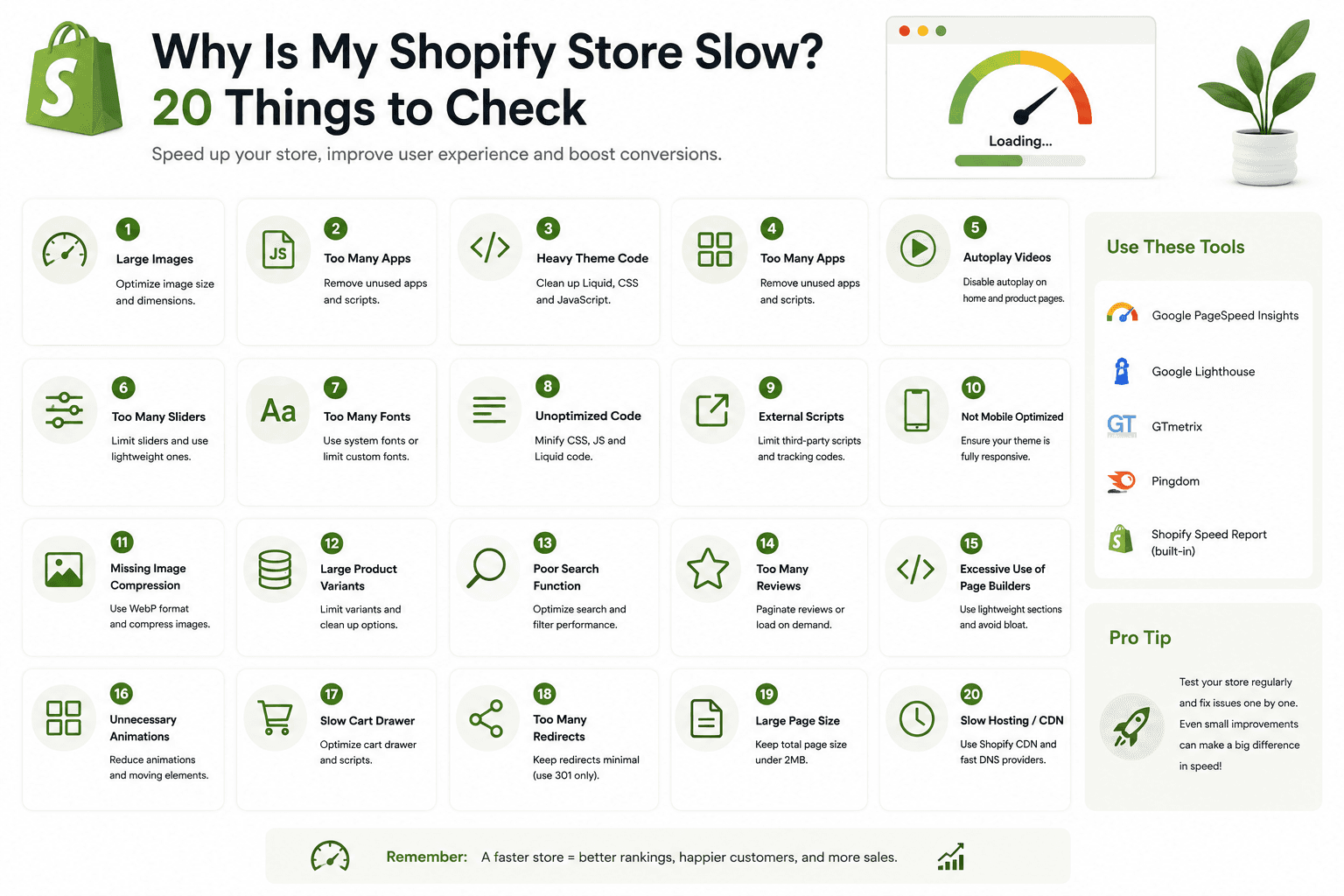
In this guide, we'll look at 20 common reasons why a Shopify store can be slow and explain what you should check before making performance changes.
Why Shopify Store Speed Matters
Why Is My Shopify Store Slow?A Shopify store can become slow for many different reasons.
The most common problems include:
- Large images
- Too many Shopify apps
- Heavy JavaScript
- Third-party scripts
- Large CSS files
- Unoptimized theme code
- Too many fonts
- Large videos
- Heavy animations
- Unnecessary app embeds
- Slow external services
- Excessive network requests
- Poor mobile optimization
- Render-blocking resources
- Layout shifts
- Incorrect image loading
- Unused code
- Heavy sliders
- Complex product pages
- Too many tracking tools
The important thing is to identify the actual bottleneck instead of randomly changing code.
Why Shopify Store Speed Matters
Before You Optimize: Test Your StoreBefore changing anything, test your store so you have a baseline.
Test important page types such as:
- Homepage
- Product page
- Collection page
- Blog article
Different templates can have very different performance characteristics.
Don't assume that because the homepage is fast, every product and collection page is also fast.
Why Shopify Store Speed Matters
What Makes a Shopify Store Fast?A fast Shopify store isn't simply a store with a high performance score.
Good performance generally involves:
- Efficient images
- Limited unnecessary JavaScript
- Efficient CSS
- Reasonable third-party resources
- Good mobile experience
- Fast rendering of important content
- Stable page layouts
- Responsive interactions
Performance should always be considered together with the actual customer experience.
Why Shopify Store Speed Matters
20 Things to Check When Your Shopify Store Is SlowWhy Shopify Store Speed Matters
1. Check Your Shopify ThemeYour theme is one of the most important parts of your storefront.
A theme can contain:
- Liquid templates
- JavaScript
- CSS
- Images
- Fonts
- App integrations
- Sliders
- Animations
A heavily customized theme may contain significantly more code than a clean theme.
If your store has been developed over several years, review whether old customizations are still necessary.
What to check
- Unused JavaScript
- Unused CSS
- Old snippets
- Unused sections
- Duplicate functionality
- Heavy animations
Why Shopify Store Speed Matters
2. Check Your Shopify AppsShopify apps can add valuable functionality, but they are also one of the most common areas to investigate when a store becomes slow.
Apps may add:
- JavaScript
- CSS
- Images
- Network requests
- Widgets
- Tracking code
Installing one additional app may not create a noticeable problem, but dozens of apps can collectively increase page complexity.
What to check
- Which apps are still being used?
- Which apps load on every page?
- Which apps add frontend scripts?
- Are multiple apps doing the same thing?
Remove apps you no longer need and review their theme integrations carefully.
Why Shopify Store Speed Matters
3. Check Third-Party JavaScriptThird-party JavaScript can come from:
- Analytics
- Advertising
- Chat widgets
- Reviews
- Heatmaps
- Social media tools
- Marketing platforms
Every additional script can introduce network requests and browser work.
Ask yourself:
Do we still need this script?

Does it load on every page?

Can it load later?

Is it actually contributing to the business?
Why Shopify Store Speed Matters
4. Optimize Large ImagesImages are frequently one of the largest resources on ecommerce pages.
Large product photos, banners, collection images, and promotional graphics can significantly increase page weight.
Check:
- Image dimensions
- File size
- Image format
- Compression
- Responsive delivery
- Loading behavior
For a detailed guide, see:
Shopify Image SEO: Alt Text, File Size and Optimization Guide
Why Shopify Store Speed Matters
5. Check Whether Images Are Larger Than Their Display SizeOne common mistake is loading a huge image when the browser only displays a small version.
For example, imagine a product card displays an image at roughly 300 pixels wide but the browser downloads an image several times larger.
That can waste bandwidth.
Use responsive image techniques and appropriate image sizes where possible.
Why Shopify Store Speed Matters
6. Check Image Loading StrategyNot every image should load at the same priority.
Images visible immediately may need different treatment from images far below the fold.
Images below the initial viewport can often use lazy loading.
However, don't blindly lazy load the main image that customers see immediately.
Why Shopify Store Speed Matters
7. Check Your JavaScript BundleJavaScript can affect both loading and interactivity.
Large JavaScript files may require the browser to:
- Download code
- Parse code
- Compile code
- Execute code
This work can become particularly noticeable on lower-powered mobile devices.
Look for
- Large bundles
- Unused libraries
- Duplicate libraries
- Heavy sliders
- Unnecessary animations
- Scripts loaded globally
Why Shopify Store Speed Matters
8. Don't Load Every Script on Every PageA script required only on the product page doesn't necessarily need to load on your blog.
Similarly, a review widget doesn't need to run on pages where there are no reviews.
Where your architecture allows it, load functionality according to the page or component that actually needs it.
Why Shopify Store Speed Matters
9. Check CSS Size and ComplexityCSS can also become unnecessarily large in a heavily customized Shopify theme.
Look for:
- Unused styles
- Duplicate rules
- Old component styles
- Large third-party CSS files
- Complex animations
Don't remove CSS simply because it looks unused. Test the storefront after making changes.
Why Shopify Store Speed Matters
10. Check Your FontsFonts can affect both loading performance and the visual rendering of your store.
Using many font families and weights can increase the number and size of font resources.
For example, a store might unnecessarily load:
Font A
100
300
400
500
600
700
800

Font B
300
400
500
700
If the design only uses a few weights, loading all of these may be unnecessary.
Why Shopify Store Speed Matters
11. Check for Font Loading ProblemsFonts can also affect how quickly text becomes visually stable.
Review:
- Number of fonts
- Font weights
- Font file sizes
- External font requests
- Fallback behavior
Use a sensible font strategy instead of loading every available weight.
Why Shopify Store Speed Matters
12. Reduce Heavy AnimationsAnimations can make a Shopify store feel polished, but excessive animation can increase browser work.
Common examples include:
- Scroll animations
- Parallax effects
- Large transitions
- Animated product cards
- Video backgrounds
- Complex sliders
Ask whether each animation improves the customer experience enough to justify its performance cost.
Why Shopify Store Speed Matters
13. Check Sliders and CarouselsSliders can require additional JavaScript, images, event handlers, and layout calculations.
A homepage containing several independent sliders can become much heavier than a simple static layout.
Review:
- Number of sliders
- Number of slides
- Image sizes
- Slider libraries
- Autoplay behavior
- Mobile behavior
If a slider isn't contributing meaningful value, consider whether it needs to exist.
Why Shopify Store Speed Matters
14. Check Video BackgroundsVideo can be one of the heaviest visual resources on a webpage.
Full-screen background videos can require significant bandwidth and browser processing.
Before using a video background, ask:
- Is the video necessary?
- Does it improve conversions?
- Can a static image communicate the same message?
- Can the video load later?
On mobile devices, a simpler visual experience may sometimes be more appropriate.
Why Shopify Store Speed Matters
15. Check Your Third-Party Tracking ToolsMarketing teams often add multiple tracking systems over time.
Your store might contain:
- Analytics
- Advertising pixels
- Conversion tracking
- Heatmaps
- Session recording
- Affiliate tracking
Individually these tools may seem small, but together they can create additional work for the browser.
Why Shopify Store Speed Matters
16. Check App EmbedsShopify app embeds can make it easy to enable functionality without directly editing theme code.
However, unused app embeds can remain enabled.
Review your active app embeds and determine whether every enabled integration is still required.
Why Shopify Store Speed Matters
17. Check Your Product Page ComplexityProduct pages can become particularly heavy because they often contain:
- Large image galleries
- Reviews
- Recommendations
- Subscriptions
- Size charts
- Product personalization
- Frequently bought together widgets
- Sticky carts
- Quick-buy components
Every additional component should provide enough value to justify its cost.
Why Shopify Store Speed Matters
18. Check Collection Page ComplexityCollection pages can also become heavy because they may display many product cards simultaneously.
Review:
- Number of products displayed
- Image dimensions
- Product-card JavaScript
- Quick-add functionality
- Filters
- Sorting
- Animations
Keep the product grid useful without loading unnecessary functionality for every card.
Why Shopify Store Speed Matters
19. Check for Layout ShiftsA page can appear fast while still feeling unstable.
Layout shifts occur when content moves unexpectedly as resources load.
Common causes include:
- Images without reserved dimensions
- Late-loading banners
- Dynamic app widgets
- Font swaps
- Injected promotional content
Reserve appropriate space for important media and dynamic content whenever possible.
Why Shopify Store Speed Matters
20. Check Core Web VitalsCore Web Vitals provide useful measurements related to real-world page experience.
Important metrics include:
- Largest Contentful Paint (LCP)
- Interaction to Next Paint (INP)
- Cumulative Layout Shift (CLS)
These metrics can help you understand different categories of performance problems.
For example:
LCP
↓
How quickly the main content becomes visible

INP
↓
How responsive the page is to interactions

CLS
↓
How stable the layout remains while loading
Don't focus on one metric alone. Look at the overall experience.
Why Shopify Store Speed Matters
How to Find the Real Cause of a Slow Shopify StoreOne of the biggest performance mistakes is changing several things at the same time.
If you remove an app, change the theme, compress images, replace fonts, and rewrite JavaScript simultaneously, you may not know which change actually improved the store.
Instead, follow a structured process.
Test
 ↓
Identify bottleneck
 ↓
Make one meaningful change
 ↓
Test again
 ↓
Compare results
 ↓
Continue
Why Shopify Store Speed Matters
How to Check Shopify Store SpeedTest several important pages instead of only the homepage.
Homepage
Check hero images, sliders, fonts, animations, apps, and tracking scripts.
Product Page
Check product images, reviews, recommendations, subscriptions, variants, and custom functionality.
Collection Page
Check product-card images, filters, sorting, pagination, and JavaScript.
Blog Page
Check article images, embedded content, fonts, scripts, and third-party widgets.
Why Shopify Store Speed Matters
Why Your Shopify Homepage May Be SlowA common homepage configuration looks like:
Announcement Bar
↓
Header
↓
Hero Slider
↓
Video
↓
Featured Collection
↓
Product Slider
↓
Banner
↓
Testimonials
↓
Instagram Feed
↓
Newsletter
↓
Footer
Every section can potentially add resources or browser work.
The solution isn't necessarily removing every section.
Instead, identify which sections provide meaningful value and optimize how their resources are loaded.
Why Shopify Store Speed Matters
Why Shopify Product Pages Can Be SlowA complex product page may include:
Product Gallery
↓
Variant Selector
↓
Product Information
↓
Reviews
↓
Size Guide
↓
Subscription Widget
↓
Sticky Add to Cart
↓
Recommendations
↓
Frequently Bought Together
↓
Recently Viewed
This can become a lot of frontend functionality.
Audit each component individually.
Why Shopify Store Speed Matters
Why Shopify Collection Pages Can Be SlowCollection pages may load many product images and interactive elements.
A page displaying 40 product cards can potentially request many images and execute additional product-card functionality.
Review whether the number of products displayed, image dimensions, filters, and JavaScript are appropriate for the design.
Why Shopify Store Speed Matters
Shopify Performance Mistakes to Avoid- Installing too many apps
- Keeping unused apps active
- Loading every script globally
- Uploading huge images
- Using too many font weights
- Adding unnecessary sliders
- Using large background videos
- Adding excessive animations
- Ignoring mobile performance
- Ignoring third-party scripts
- Adding duplicate functionality
- Loading unnecessary widgets
- Ignoring layout shifts
- Optimizing only the homepage
- Changing everything at once
Why Shopify Store Speed Matters
How to Speed Up a Shopify Store Step by StepIf your store is slow, use this practical workflow.
1. Test important pages
        ↓
2. Identify the largest resources
        ↓
3. Check images
        ↓
4. Audit apps
        ↓
5. Audit third-party scripts
        ↓
6. Review JavaScript
        ↓
7. Review CSS
        ↓
8. Review fonts
        ↓
9. Check animations and sliders
        ↓
10. Check mobile performance
        ↓
11. Review Core Web Vitals
        ↓
12. Make targeted changes
        ↓
13. Test again
        ↓
14. Monitor results
Why Shopify Store Speed Matters
Should You Change Your Shopify Theme?A slow store does not automatically mean you need a new theme.
Before replacing the theme, investigate:
- Apps
- Custom code
- Images
- JavaScript
- Third-party services
- Fonts
Sometimes the problem is caused by customizations rather than the underlying theme.
Why Shopify Store Speed Matters
When Should You Consider a New Shopify Theme?A theme change may be worth considering when the existing theme has become difficult to maintain or contains significant technical limitations.
Before migrating, benchmark the existing store and clearly define what problems the new theme is expected to solve.
Why Shopify Store Speed Matters
Does Shopify Hosting Make My Store Fast?Shopify manages the underlying ecommerce platform infrastructure, but storefront performance still depends on the theme, assets, apps, scripts, and content you put on the storefront.
Good hosting alone cannot compensate for an unnecessarily heavy frontend.
Why Shopify Store Speed Matters
Does a High PageSpeed Score Guarantee More Sales?No.
Performance is important, but conversion also depends on:
- Product quality
- Pricing
- Trust
- Product presentation
- Checkout experience
- Shipping
- Customer service
- Search intent
Performance optimization should support the overall customer journey rather than become the only goal.
Why Shopify Store Speed Matters
Shopify Speed Optimization Checklist- Test the homepage
- Test product pages
- Test collection pages
- Test blog pages
- Compress oversized images
- Check image dimensions
- Use responsive image delivery
- Review image loading strategy
- Audit Shopify apps
- Review app embeds
- Audit third-party scripts
- Reduce unnecessary JavaScript
- Review CSS
- Reduce unnecessary font weights
- Review animations
- Review sliders
- Review video backgrounds
- Check Core Web Vitals
- Test mobile devices
- Make changes gradually and retest
Why Shopify Store Speed Matters
Frequently Asked QuestionsWhy is my Shopify store so slow?
Common causes include large images, too many apps, third-party scripts, heavy JavaScript, large CSS files, excessive fonts, animations, sliders, videos, and complex product or collection pages. The exact cause needs to be identified through performance testing.
Do Shopify apps slow down a website?
Some apps can add frontend resources such as JavaScript, CSS, widgets, images, and network requests. The impact varies by app and implementation, so test the actual store rather than assuming every app has the same performance impact.
How can I make my Shopify store faster?
Start by testing important page templates. Then investigate large images, apps, third-party scripts, JavaScript, CSS, fonts, videos, animations, and Core Web Vitals. Make targeted changes and measure the result after each major optimization.
Can too many images make Shopify slow?
Yes. Large images and excessive image requests can increase page weight and loading work. Use appropriate dimensions, compression, responsive image delivery, and suitable loading strategies.
Should I remove all Shopify apps to improve speed?
No. Apps can provide important business functionality. Instead, identify which apps add meaningful value and investigate the actual resources they load. Remove unnecessary apps rather than removing everything blindly.
Does changing the Shopify theme make a store faster?
A different theme may improve performance if the existing theme has significant technical limitations, but changing themes isn't a guaranteed solution. Apps, images, scripts, and custom code can continue causing performance problems after a migration.
Why is my Shopify store slow on mobile but fast on desktop?
Mobile devices can have less processing power and different network conditions. Heavy JavaScript, large images, third-party scripts, and complex animations can therefore become more noticeable on mobile.
What Shopify pages should I optimize first?
Start with pages that receive significant traffic or generate important business outcomes. Typically this includes the homepage, major collection pages, important product pages, and high-traffic landing pages.
Does Core Web Vitals matter for Shopify?
Core Web Vitals provide useful measurements of loading performance, responsiveness, and visual stability. They should be considered as part of a broader technical and user-experience strategy.
Should I optimize for a perfect PageSpeed score?
No. A performance score is useful for identifying opportunities, but it isn't the same thing as the complete customer experience. Focus on meaningful performance improvements without sacrificing important ecommerce functionality or product presentation.
Why Shopify Store Speed Matters
Final ThoughtsIf your Shopify store is slow, don't immediately assume that Shopify itself is the problem.
In many cases, the biggest performance issues come from the storefront layer: large images, apps, third-party scripts, JavaScript, fonts, animations, videos, and unnecessary custom functionality.
Start with measurement.
Test your homepage, product pages, collection pages, and important landing pages. Identify the largest resources and the areas causing the most browser work.
Then optimize systematically.
Compress and resize images, review Shopify apps, reduce unnecessary JavaScript, simplify heavy components, review fonts, improve mobile behavior, and investigate Core Web Vitals.
Most importantly, don't change everything at once. Make targeted improvements, test again, and compare the results.
A fast Shopify store isn't simply one with a high performance score. It is a store that allows customers to quickly see products, browse collections, interact with the interface, and complete their shopping journey without unnecessary delays.