A Shopify store can have great products, attractive design, and useful content but still struggle to perform well in organic search if its technical SEO foundation is weak.
Technical SEO is the part of optimization that helps search engines discover, crawl, understand, and access the important pages on your website.
For Shopify stores, technical SEO can become particularly important because ecommerce websites often contain large numbers of products, collections, filters, variants, images, apps, redirects, and automatically generated URLs.
A technical SEO audit helps you identify problems before they become bigger issues.
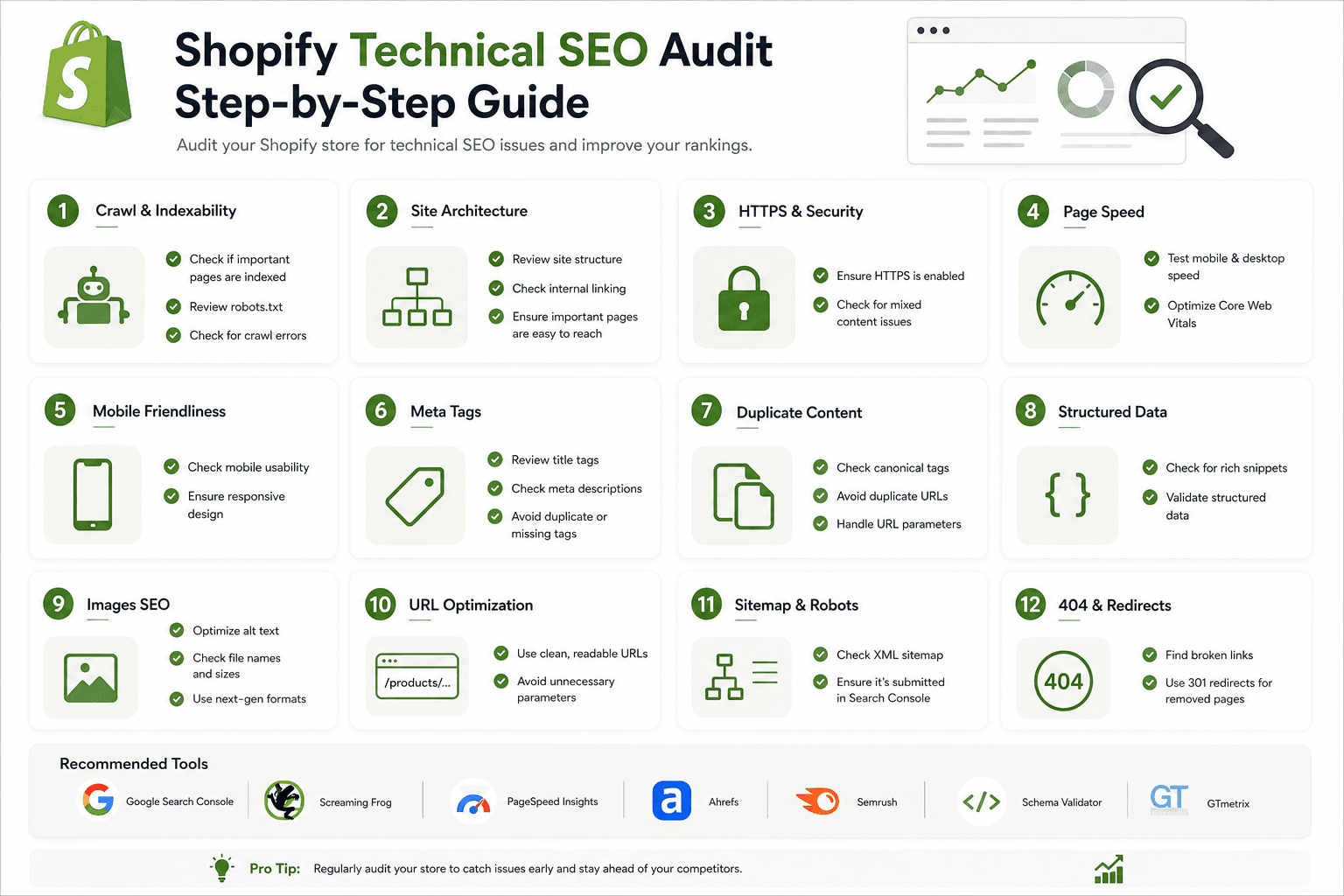
In this guide, we'll walk through a practical Shopify technical SEO audit covering crawlability, indexing, URLs, canonical tags, redirects, sitemaps, robots directives, internal links, structured data, images, mobile performance, Core Web Vitals, JavaScript, apps, and more.
Why Shopify Store Speed Matters
What Is a Shopify Technical SEO Audit?A technical SEO audit is a systematic review of the technical elements that affect how search engines access and understand your website.
For a Shopify store, an audit can include:
- Crawlability
- Indexability
- Canonical URLs
- Redirects
- XML sitemap
- Robots directives
- URL structure
- Internal linking
- Duplicate content
- Page titles and metadata
- Structured data
- Image optimization
- Mobile usability
- Page performance
- JavaScript
- Third-party applications
The objective isn't to change everything.
The objective is to identify problems, prioritize them, and fix the issues that can provide the most meaningful improvement.
Why Shopify Store Speed Matters
Why Shopify Technical SEO MattersSearch engines need to be able to discover your important pages and understand how they relate to one another.
Imagine an ecommerce website with:
10,000 products
500 collections
Thousands of filter combinations
Hundreds of blog articles
20+ Shopify apps
Without a clear technical structure, the number of URLs and resources can grow quickly.
A technical audit helps you determine which pages and resources deserve attention and which URL variations are simply part of normal ecommerce navigation.
Why Shopify Store Speed Matters
Shopify Technical SEO Audit Checklist- Check HTTPS
- Check site accessibility
- Check indexability
- Review robots.txt
- Review XML sitemap
- Check canonical URLs
- Check redirects
- Find broken links
- Review URL structure
- Check duplicate content
- Review title tags
- Review meta descriptions
- Check heading structure
- Review internal links
- Check breadcrumbs
- Review structured data
- Optimize images
- Test mobile performance
- Test Core Web Vitals
- Review JavaScript
- Audit third-party apps
- Check pagination and filters
- Review product and collection pages
- Check Search Console data
- Prioritize and document fixes
Why Shopify Store Speed Matters
Step 1: Make Sure Your Shopify Store Uses HTTPSThe first step of a technical audit is confirming that your website is served securely over HTTPS.
Your main website should load using:
https://example.comrather than:
http://example.comShopify provides SSL/TLS support for Shopify-hosted stores, but you should still verify that your domain resolves correctly and that visitors aren't unexpectedly encountering insecure versions.
Why Shopify Store Speed Matters
Step 2: Check Whether Your Homepage Loads CorrectlyOpen your main domain in a browser and test:
- Desktop
- Mobile
- Incognito mode
- Different browsers
Check whether the site loads correctly and whether there are unexpected redirects, errors, or broken resources.
Why Shopify Store Speed Matters
Step 3: Check Your Preferred DomainMake sure your store has a consistent primary domain.
You don't want visitors and internal links unnecessarily switching between different versions of the same domain.
Check common variations such as:
https://example.com

https://www.example.com

http://example.com

http://www.example.com
Your domain configuration should provide a consistent experience for users and search engines.
Why Shopify Store Speed Matters
Step 4: Check Your XML SitemapShopify automatically provides an XML sitemap for stores.
The sitemap is normally available at:
/sitemap.xmlOpen the sitemap and make sure it is accessible.
A sitemap helps search engines discover URLs that you want them to know about.
Why Shopify Store Speed Matters
Step 5: Understand What Your Sitemap ContainsShopify's sitemap system can include different sitemap files for different types of content.
Depending on the store, you may encounter URLs associated with:
- Products
- Collections
- Pages
- Blog content
The exact sitemap structure can change as Shopify evolves, so focus on whether important indexable URLs are being surfaced correctly.
Why Shopify Store Speed Matters
Step 6: Submit Your Sitemap to Search ConsoleIf your store is connected to Google Search Console, make sure the sitemap is submitted and that you can monitor its processing status.
This gives you another way to monitor how search engines are discovering your site.
Why Shopify Store Speed Matters
Step 7: Review robots.txtShopify also provides a robots.txt file for stores.
It is normally available at:
/robots.txtRobots directives can influence which areas crawlers are allowed or discouraged from accessing.
Don't edit robots.txt simply because you see a directive you don't immediately recognize.
Why Shopify Store Speed Matters
Step 8: Don't Block Important Pages AccidentallyDuring an audit, identify important pages such as:
- Homepage
- Important collections
- Important products
- Important pages
- Blog articles
Make sure your technical configuration isn't preventing search engines from accessing content that you actually want discovered.
Why Shopify Store Speed Matters
Step 9: Check IndexabilityCrawlability and indexability are related but different concepts.
A page may be accessible to a crawler but still not be eligible for indexing for various reasons.
Review important pages for:
- Robots directives
- Canonical URLs
- HTTP status codes
- Page availability
- Internal links
Why Shopify Store Speed Matters
Step 10: Check Important Pages in Search ConsoleSearch Console can provide useful information about individual URLs.
Select important pages and investigate whether search engines have discovered and indexed the URLs as expected.
Prioritize pages that matter most to your business rather than checking thousands of URLs manually.
Why Shopify Store Speed Matters
Step 11: Review Canonical URLsCanonicalization is particularly important for ecommerce websites because the same product can sometimes be accessed through different URL paths.
For example:
/products/black-running-shoes

/collections/running-shoes/products/black-running-shoes
Review whether the preferred product URL is being identified consistently.
Why Shopify Store Speed Matters
Step 12: Check for Conflicting Canonical SignalsA canonical tag is only one part of your site's overall SEO signals.
Also check:
- Internal links
- Sitemap URLs
- Redirects
- Page content
Ideally, important signals should point toward the same preferred URL.
Why Shopify Store Speed Matters
Step 13: Check Duplicate ContentShopify stores can naturally create duplicate or near-duplicate content through:
- Collection product paths
- Filters
- Sorting
- Tracking parameters
- Duplicate product descriptions
- Similar collections
Don't treat every duplicate URL as an error.
First understand why the URL exists and whether it provides unique value.
For a deeper explanation, see our guide:
How to Fix Duplicate Content Problems in Shopify
Why Shopify Store Speed Matters
Step 14: Find Broken LinksBroken internal links can create poor user experiences and make site navigation less reliable.
Look for links returning errors such as:
404 Not FoundCommon causes include:
- Deleted products
- Deleted collections
- Changed page URLs
- Old blog links
- Theme changes
- App-generated links
Why Shopify Store Speed Matters
Step 15: Fix Important 404 ErrorsNot every 404 URL needs a redirect.
If a page has a relevant replacement, a redirect may make sense.
If there is no useful replacement, forcing a redirect to an unrelated page can create a poor experience.
Focus on important broken URLs that users and search engines are likely to encounter.
Why Shopify Store Speed Matters
Step 16: Audit RedirectsRedirects are useful when URLs permanently change, but large stores can accumulate redirect chains over time.
For example:
Old URL
   ↓
Redirect 1
   ↓
Redirect 2
   ↓
Final URL
Where practical, clean unnecessary chains so old URLs point directly to the final relevant destination.
Why Shopify Store Speed Matters
Step 17: Check Redirect LoopsA redirect loop occurs when URLs keep sending visitors back and forth.
URL A
 ↓
URL B
 ↓
URL A
This can prevent the page from loading correctly.
Test important redirects after theme or domain changes.
Why Shopify Store Speed Matters
Step 18: Review Your URL StructureShopify provides a predictable URL structure for major content types.
/products/
/collections/
/pages/
/blogs/
Keep your URLs readable and meaningful.
Avoid changing established URLs without a clear reason.
Why Shopify Store Speed Matters
Step 19: Avoid Unnecessary URL ChangesA URL should not be changed simply because you want to insert another keyword.
Before changing an established URL, consider:
- Organic traffic
- Backlinks
- Existing rankings
- Internal links
- Redirect requirements
Why Shopify Store Speed Matters
Step 20: Review Product PagesProduct pages are among the most valuable pages on most Shopify stores.
Check:
- Unique product title
- Useful description
- Relevant images
- Image alt text
- Canonical URL
- Structured data
- Price information
- Availability information
- Internal links
- Mobile usability
You can also read:
How to Optimize a Shopify Product Page for SEO
Why Shopify Store Speed Matters
Step 21: Review Collection PagesCollection pages can target broader category-level search intent.
Review:
- Collection name
- H1
- SEO title
- Meta description
- Collection description
- Product relevance
- Filters
- Pagination
- Internal links
Read our detailed guide:
Shopify Collection Page SEO: Complete Optimization Guide
Why Shopify Store Speed Matters
Step 22: Review Image OptimizationEcommerce websites can contain a large number of images, so image performance deserves special attention.
Check:
- File size
- Image dimensions
- Responsive delivery
- Alt text
- Loading behavior
- Layout stability
For more information:
Shopify Image SEO: Alt Text, File Size and Optimization Guide
Why Shopify Store Speed Matters
Step 23: Check Mobile UsabilityOpen important pages on a real mobile device or use browser testing tools.
Check:
- Navigation
- Product grids
- Images
- Buttons
- Forms
- Filters
- Menus
- Popups
- Text size
A page can technically work on mobile while still providing a poor user experience.
Why Shopify Store Speed Matters
Step 24: Test Page SpeedPerformance should be part of every Shopify technical SEO audit.
Look for:
- Large images
- Unused JavaScript
- Third-party scripts
- Large CSS files
- Font loading issues
- Heavy animations
- Unnecessary network requests
Why Shopify Store Speed Matters
Step 25: Check Core Web VitalsCore Web Vitals provide useful signals about real-world page experience.
Important metrics include:
- Largest Contentful Paint (LCP)
- Interaction to Next Paint (INP)
- Cumulative Layout Shift (CLS)
Use performance tools and real-user data where available to understand which pages need attention.
For a deeper guide:
How to Optimize Core Web Vitals for Better SEO Rankings
Why Shopify Store Speed Matters
Step 26: Identify the Largest Contentful ElementOn ecommerce pages, the largest content element might be:
- Hero image
- Product image
- Large heading
- Collection banner
Identify what is slowing down the main visual content and optimize the underlying resource.
Why Shopify Store Speed Matters
Step 27: Investigate Layout ShiftsLayout shifts happen when visible content moves unexpectedly while the page is loading.
Common causes include:
- Images without reserved dimensions
- Late-loading banners
- Dynamic app content
- Fonts changing layout
- Injected promotional elements
Test your pages during loading rather than only after everything has finished loading.
Why Shopify Store Speed Matters
Step 28: Audit JavaScriptShopify themes and apps can use JavaScript for:
- Sliders
- Quick views
- Filters
- Cart drawers
- Wishlist functionality
- Reviews
- Analytics
- Chat
JavaScript isn't automatically bad for SEO.
The problem is unnecessary or inefficient JavaScript that creates performance, usability, or rendering issues.
Why Shopify Store Speed Matters
Step 29: Audit Third-Party Shopify AppsThird-party apps can provide valuable functionality, but every app can potentially add resources to your store.
Review:
- App scripts
- App embeds
- Tracking scripts
- Widgets
- CSS
- Network requests
Ask whether each installed app is still needed.
Why Shopify Store Speed Matters
Step 30: Remove Unused Apps and App Code CarefullyUninstalling an app doesn't always guarantee that every piece of previously added code has disappeared from a theme.
If you remove an app, inspect the theme and test the store carefully.
Don't delete unfamiliar code blindly.
Why Shopify Store Speed Matters
Step 31: Review Theme CodeCustom theme code can introduce technical SEO and performance problems.
Review customizations involving:
- Head tags
- Canonical URLs
- Structured data
- JavaScript
- Images
- Navigation
- Product templates
- Collection templates
Why Shopify Store Speed Matters
Step 32: Check Your Heading StructureImportant pages should have a logical heading hierarchy.
For example:
H1
Shopify Product Collection

H2
Featured Products

H2
How to Choose the Right Product

H3
Important Features
Don't add headings simply to manipulate keyword usage.
Why Shopify Store Speed Matters
Step 33: Check Title TagsImportant pages should have meaningful title tags.
Check for:
- Missing titles
- Duplicate titles
- Unclear titles
- Keyword stuffing
- Titles that don't match the page
Why Shopify Store Speed Matters
Step 34: Check Meta DescriptionsReview important pages for useful and relevant meta descriptions.
Avoid creating descriptions that simply repeat the title.
A good description should help a searcher understand what the page offers.
Why Shopify Store Speed Matters
Step 35: Audit Internal LinksInternal links help users navigate your store and help search engines understand relationships between pages.
Important pages should not be isolated.
Review links between:
- Homepage
- Collections
- Products
- Blog posts
- Buying guides
- Important informational pages
Why Shopify Store Speed Matters
Step 36: Find Orphan PagesAn orphan page is a page that has little or no meaningful internal linking from other parts of the website.
Important pages should generally be discoverable through your site's navigation or contextual links.
Why Shopify Store Speed Matters
Step 37: Review Anchor TextInternal link anchor text should make sense to the user.
Instead of repeatedly using:
Click hereuse descriptive wording where appropriate.
Shop men's running shoesDon't over-optimize every internal link with the exact same keyword phrase.
Why Shopify Store Speed Matters
Step 38: Check BreadcrumbsBreadcrumbs can help users understand where they are within a large ecommerce site.
Example:
Home
  › Men's Shoes
      › Running Shoes
          › Product
Check that breadcrumb links point to useful pages and reflect the actual site structure.
Why Shopify Store Speed Matters
Step 39: Audit Structured DataStructured data helps communicate information about a page in a machine-readable format.
Depending on your store, you may encounter structured data related to:
- Products
- Breadcrumbs
- Organization
- Website information
- Other supported entities
Check that the structured data accurately represents visible page content.
Why Shopify Store Speed Matters
Step 40: Avoid Duplicate Structured DataShopify themes and apps can both add structured data.
This can sometimes result in multiple implementations describing similar information.
Audit your rendered HTML before adding another schema implementation.
Why Shopify Store Speed Matters
Step 41: Review Product Structured DataProduct pages are particularly important for structured data because they contain information such as:
- Product name
- Images
- Price
- Availability
- Brand
Make sure your implementation accurately reflects the product shown to users.
Why Shopify Store Speed Matters
Step 42: Review Collection FiltersFilters can generate many URL variations.
Review whether your filter system is creating:
- Unnecessary crawlable URLs
- Near-duplicate pages
- Confusing navigation
- Performance problems
Don't assume every filter needs to become an SEO landing page.
Why Shopify Store Speed Matters
Step 43: Check PaginationLarge collections often use pagination to divide products across multiple pages.
Make sure:
- Pagination works
- Products remain accessible
- Links are usable
- There are no broken pagination URLs
Why Shopify Store Speed Matters
Step 44: Review Search PagesInternal search is useful for customers but doesn't automatically need to be an SEO landing-page strategy.
Review whether search result URLs are generating unnecessary crawl variations.
Why Shopify Store Speed Matters
Step 45: Check Blog ArchitectureIf your Shopify store includes a blog, audit:
- Blog URLs
- Article titles
- Article descriptions
- Internal links
- Images
- Categories or tags where applicable
- Canonical URLs
Your blog should support the commercial parts of your store without becoming a collection of thin pages.
Why Shopify Store Speed Matters
Step 46: Connect Blog Content to Commercial PagesEducational articles can naturally link to relevant collections and products.
For example:
Blog Article
      ↓
Buying Guide
      ↓
Collection
      ↓
Product
This creates useful connections between informational and commercial content.
Why Shopify Store Speed Matters
Step 47: Review Image SEOCheck important images for:
- Useful alt text
- Appropriate dimensions
- Reasonable file size
- Responsive behavior
- Correct loading strategy
Don't add keyword-stuffed alt text simply because you are performing an SEO audit.
Why Shopify Store Speed Matters
Step 48: Check Mobile NavigationMobile navigation should make important categories and pages easy to discover.
Test:
- Main menu
- Collection navigation
- Product links
- Search
- Filters
- Cart
Why Shopify Store Speed Matters
Step 49: Review 404 PagesA useful 404 page can help visitors recover when they reach an invalid URL.
Consider providing:
- A clear error message
- Search
- Popular collections
- Homepage navigation
Don't automatically redirect every invalid URL to the homepage just to eliminate 404 responses.
Why Shopify Store Speed Matters
Step 50: Document and Prioritize Your FindingsA technical audit is only useful if you know what to fix first.
Create a simple priority system.
High Priority
↓
Blocks crawling/indexing
Broken important pages
Incorrect canonical signals
Major performance problems

Medium Priority
↓
Duplicate metadata
Internal linking problems
Image optimization
Structured data improvements

Low Priority
↓
Minor metadata improvements
Small UX issues
Non-critical cleanup
Fix high-impact issues first rather than spending hours on minor optimizations.
Why Shopify Store Speed Matters
How to Perform a Shopify Technical SEO AuditA practical audit can follow this workflow:
Step 1
Check website accessibility
        ↓
Step 2
Check HTTPS and domain
        ↓
Step 3
Review robots.txt
        ↓
Step 4
Review sitemap.xml
        ↓
Step 5
Check indexing
        ↓
Step 6
Audit canonical URLs
        ↓
Step 7
Find duplicate content
        ↓
Step 8
Audit redirects and 404s
        ↓
Step 9
Review product pages
        ↓
Step 10
Review collection pages
        ↓
Step 11
Audit internal links
        ↓
Step 12
Review structured data
        ↓
Step 13
Audit images
        ↓
Step 14
Test mobile UX
        ↓
Step 15
Test Core Web Vitals
        ↓
Step 16
Audit JavaScript and apps
        ↓
Step 17
Prioritize fixes
        ↓
Step 18
Monitor results
Why Shopify Store Speed Matters
Tools You Can Use for a Shopify Technical SEO AuditYou don't need every SEO tool available to perform a useful audit.
A practical toolkit can include:
- Google Search Console
- Google Analytics
- PageSpeed Insights
- Chrome DevTools
- A technical SEO crawler
- Browser source inspection
Use multiple sources of information instead of relying on one automated score.
Why Shopify Store Speed Matters
Google Search Console for Shopify SEOSearch Console can help you understand how your site appears in Google Search and can provide useful information about indexing and search performance.
During an audit, review:
- Performance
- Indexing
- Sitemaps
- URL inspection
- Core Web Vitals
Why Shopify Store Speed Matters
PageSpeed Insights for ShopifyPageSpeed Insights can help identify performance opportunities for individual pages.
Test important templates such as:
- Homepage
- Product page
- Collection page
- Blog article
- Cart or other important customer-flow pages
Don't test only the homepage. Different Shopify templates can have very different performance characteristics.
Why Shopify Store Speed Matters
Chrome DevTools for Technical SEOChrome DevTools is particularly useful for developers.
You can inspect:
- HTML
- Network requests
- JavaScript
- CSS
- Images
- Console errors
- Performance behavior
Why Shopify Store Speed Matters
Shopify Technical SEO Audit Report TemplateIf you're auditing a Shopify store for a client, you can organize your findings like this:
Issue:
Duplicate canonical URL

Affected Pages:
Product templates

Impact:
Search engines may receive conflicting URL signals

Priority:
High

Recommended Action:
Review canonical implementation and internal links

Status:
Pending
This format makes technical recommendations easier for clients and developers to understand.
Why Shopify Store Speed Matters
Shopify Technical SEO Audit ExampleImagine a Shopify store has the following problems:
- Large collection images
- Several unused apps
- Duplicate product descriptions
- Broken internal links
- Incorrect custom canonical logic
- Slow mobile performance
You wouldn't necessarily fix them in random order.
A reasonable priority might be:
1. Fix incorrect canonical implementation
2. Fix important broken links
3. Investigate major mobile performance issues
4. Remove unnecessary app resources
5. Optimize important images
6. Improve duplicate product content
7. Continue monitoring
The exact priority depends on the store and the severity of each issue.
Why Shopify Store Speed Matters
Common Shopify Technical SEO Mistakes- Changing URLs unnecessarily
- Blocking important pages
- Ignoring canonical URLs
- Creating thousands of filter pages
- Ignoring duplicate content
- Leaving broken internal links
- Creating redirect chains
- Installing too many apps
- Loading unnecessary JavaScript
- Serving oversized images
- Ignoring mobile performance
- Adding duplicate structured data
- Ignoring orphan pages
- Optimizing only the homepage
- Fixing SEO warnings without understanding them
Why Shopify Store Speed Matters
Technical SEO Audit Checklist Before Making Changes- Do I understand why this issue exists?
- How many pages are actually affected?
- Are the affected pages important to the business?
- Do they receive organic traffic?
- Do they have backlinks?
- Is the issue affecting users?
- Could the proposed fix create new problems?
- Have I tested the fix on a development or duplicate theme where appropriate?
- Have I documented the original behavior?
- Do I have a rollback plan for major changes?
Why Shopify Store Speed Matters
Frequently Asked QuestionsWhat is a Shopify technical SEO audit?
A Shopify technical SEO audit is a systematic review of the technical elements that affect how search engines discover, crawl, understand, and access a Shopify store. It can include indexing, canonical URLs, redirects, sitemaps, robots directives, internal links, structured data, performance, mobile usability, and more.
How often should I perform a Shopify SEO audit?
The appropriate frequency depends on the size and activity of the store. Smaller stores may perform a detailed audit periodically, while larger stores with frequent product, theme, and app changes may benefit from more regular technical monitoring.
What is the most important part of a Shopify technical SEO audit?
There isn't one universal issue that matters most for every store. Start with problems that can prevent important pages from being discovered, crawled, indexed, or properly understood. Then address major performance, usability, and content-quality issues.
Does Shopify handle technical SEO automatically?
Shopify provides several technical features that support SEO, but store owners and developers still need to manage areas such as page content, internal linking, theme customizations, apps, performance, collection architecture, redirects, and overall site structure.
How do I check Shopify canonical URLs?
Open an important page in your browser, inspect its rendered HTML, and look for the canonical link element. You can also use SEO auditing tools and search-engine URL inspection features to investigate how canonicalization is being handled.
Can Shopify apps hurt SEO?
Apps can add useful functionality, but some can also introduce JavaScript, CSS, network requests, widgets, or additional pages. Review the actual impact of each app instead of assuming that every app is harmful or beneficial.
How do I improve Shopify technical SEO?
Start by auditing crawlability, indexability, canonical URLs, redirects, internal links, duplicate content, structured data, images, mobile usability, performance, JavaScript, and third-party apps. Prioritize issues based on their impact rather than trying to fix every automated warning.
Does Shopify technical SEO affect rankings?
Technical SEO can affect whether search engines can effectively access, understand, and process your website. However, rankings depend on many factors, including content relevance, site quality, search intent, competition, links, and overall user experience.
Why Shopify Store Speed Matters
Final ThoughtsA Shopify technical SEO audit is not about chasing a perfect SEO score.
The goal is to build a store that search engines can efficiently discover and understand while providing customers with a fast, accessible, and reliable shopping experience.
Start with the technical foundation: HTTPS, domain configuration, crawlability, indexability, robots directives, and sitemap accessibility.
Then move into canonical URLs, duplicate content, redirects, internal links, product pages, collection pages, structured data, images, mobile usability, Core Web Vitals, JavaScript, and third-party applications.
Don't make technical changes simply because an SEO tool produces a warning.
First understand the problem, determine which pages are affected, evaluate the business impact, and then choose the appropriate solution.
A strong Shopify SEO strategy combines technical SEO, useful content, logical site architecture, performance, accessibility, and a good customer experience.
When these elements work together, your Shopify store becomes easier for search engines to crawl and understand and easier for customers to navigate and purchase from.