Images are one of the most important elements of an ecommerce website.
Customers use product images to understand what they're buying, compare products, inspect details, and decide whether a product is worth purchasing.
Images can also affect your Shopify store's SEO, accessibility, and page performance.
A store with beautiful product photography can still have problems if its images are unnecessarily large, poorly named, missing useful alternative text, or loaded inefficiently.
This is why Shopify image SEO should be part of both your ecommerce SEO and performance strategy.
In this guide, we'll explain how to optimize Shopify images for search engines and users, including alt text, image file size, dimensions, compression, responsive images, lazy loading, image formats, product images, collection images, accessibility, and common optimization mistakes.
Why Shopify Store Speed Matters
What Is Shopify Image SEO?Shopify image SEO is the process of optimizing images so they are useful for visitors, accessible to users with different needs, understandable to search engines, and efficient to load.
Image optimization involves several areas:
- Descriptive alt text
- Appropriate image dimensions
- Reasonable file size
- Suitable image formats
- Responsive image delivery
- Correct loading behavior
- Useful filenames
- Good visual quality
- Mobile optimization
- Accessibility
The objective isn't simply to make every image as small as possible. You want to find the right balance between quality, performance, accessibility, and usefulness.
Why Shopify Store Speed Matters
Why Image SEO Matters for Shopify StoresEcommerce stores often contain hundreds or thousands of images.
Product galleries alone can contain multiple high-resolution images, while collection pages may display dozens of product cards.
Poorly optimized images can contribute to:
- Slower page loading
- Higher data usage
- Poorer mobile experiences
- Layout shifts
- Slower interactions
- Accessibility problems
Optimized images can make pages easier to use while giving search engines more useful context about visual content.
Why Shopify Store Speed Matters
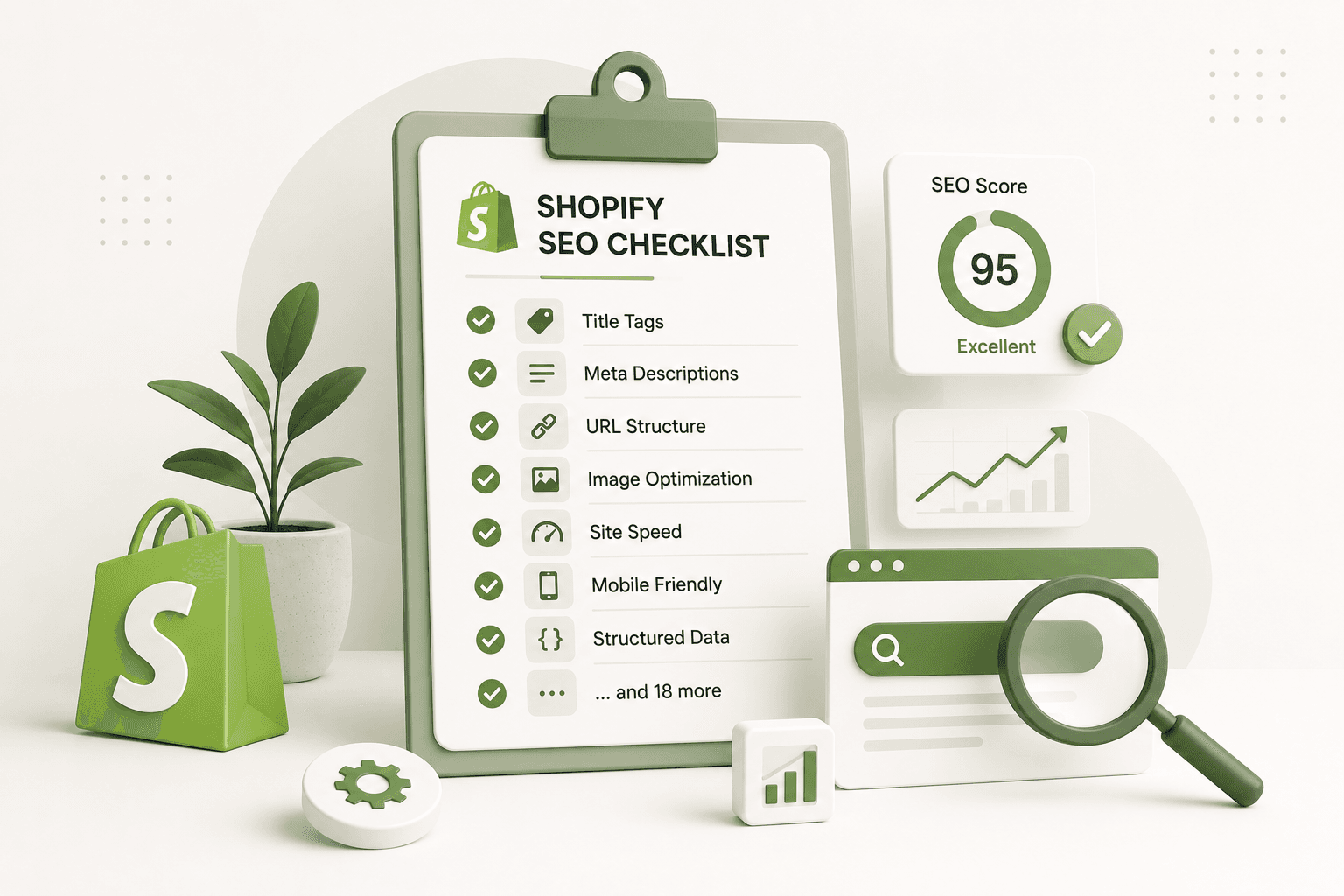
Shopify Image SEO ChecklistBefore publishing important images, check:
- Is the image actually useful?
- Does it have appropriate dimensions?
- Is the file unnecessarily large?
- Is the image quality good enough?
- Does meaningful content have useful alt text?
- Is decorative imagery handled appropriately?
- Is the image responsive?
- Is loading behavior appropriate?
- Does the image cause layout shifts?
- Does it work well on mobile?
- Is the image relevant to the page?
- Is the filename understandable?
- Are important above-the-fold images prioritized correctly?
Why Shopify Store Speed Matters
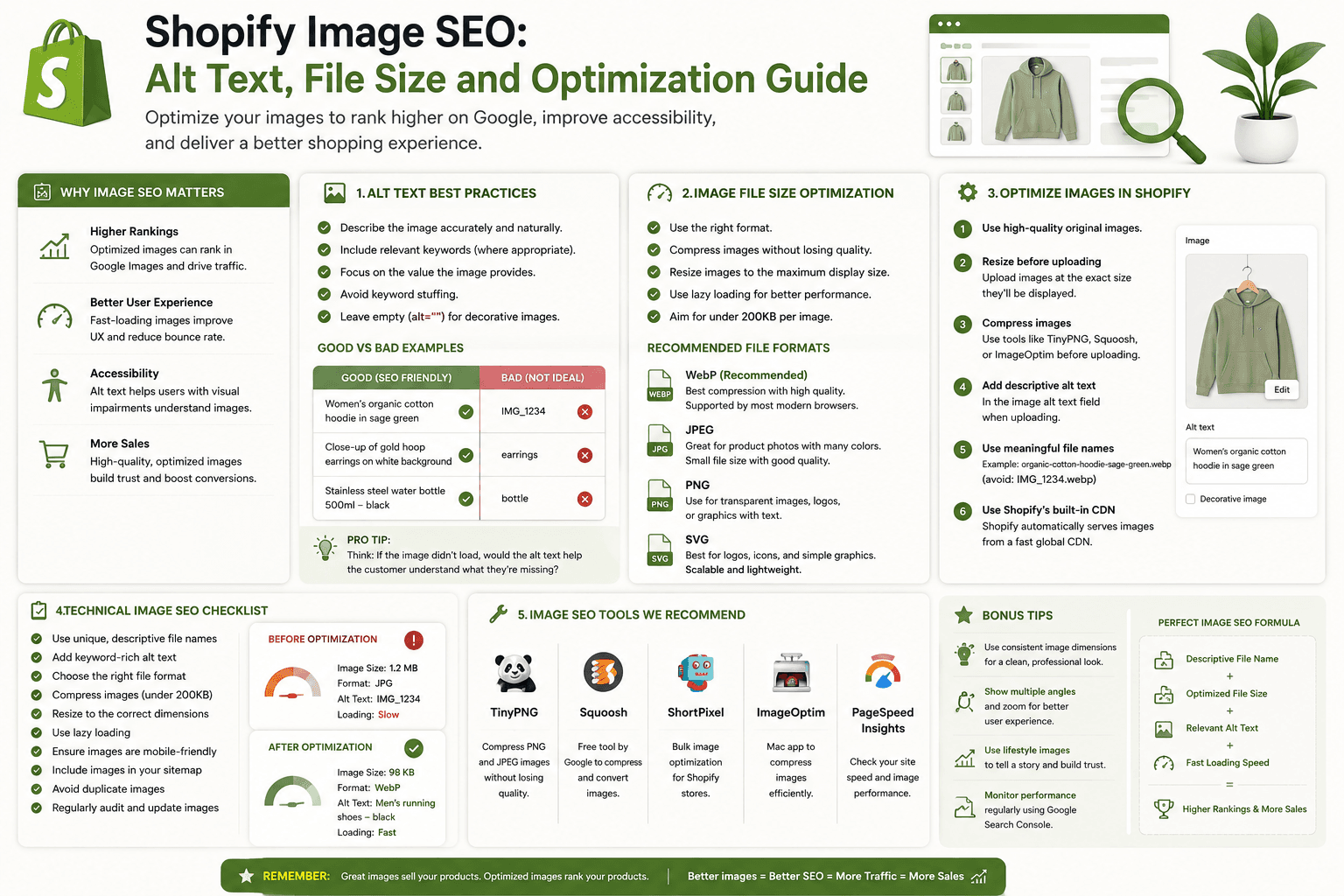
1. Write Descriptive Alt TextAlt text is one of the most important image accessibility features.
It provides a textual description of an image when the image cannot be perceived visually.
For a product image, useful alt text might be:
Brown leather bifold wallet with six card slotsThis tells the user what the image represents.
Avoid:
image123.jpgor:
best leather wallet cheap leather wallet buy wallet
online leather wallet
Alt text should describe the actual image rather than function as a list of keywords.
Why Shopify Store Speed Matters
2. Don't Stuff Keywords Into Alt TextOne of the most common image SEO mistakes is treating alt text as a keyword field.
Imagine the image shows a black backpack.
A poor alt attribute could be:
best black backpack black backpack cheap black backpack
buy black backpack online
A better description is:
Black waterproof backpack with padded laptop compartmentThe second version is more useful because it describes what the image actually shows.
Why Shopify Store Speed Matters
3. Make Alt Text Specific to Each ImageIf a product has several useful images, don't automatically give every image identical alt text.
For example:
Image 1:
Black leather backpack front view

Image 2:
Black leather backpack open with laptop compartment

Image 3:
Black leather backpack padded shoulder straps

Image 4:
Black leather backpack interior pockets
Each description communicates something different.
Why Shopify Store Speed Matters
4. Know When Alt Text Should Be EmptyNot every image needs descriptive alt text.
Decorative images that don't add meaningful information can generally use an empty alt attribute:
alt=""The important distinction is whether the image communicates meaningful information.
Don't add keyword-heavy descriptions to purely decorative backgrounds simply because you want additional SEO text.
Why Shopify Store Speed Matters
5. Optimize Product ImagesProduct images are usually some of the most important images on an ecommerce website.
They should be:
- Sharp enough to inspect
- Properly cropped
- Consistent where appropriate
- Responsive
- Reasonably compressed
- Described accurately
Don't sacrifice useful product detail simply to achieve the smallest possible file size.
Why Shopify Store Speed Matters
6. Choose Appropriate Image DimensionsImage dimensions and file size are related, but they are not the same thing.
An image can have reasonable compression but still be unnecessarily large in physical dimensions.
For example, serving a huge image when the product card only displays a small thumbnail wastes bandwidth.
Consider how large the image actually needs to be for its intended use.
Why Shopify Store Speed Matters
7. Don't Upload Every Image at Maximum ResolutionA common mistake is taking a very large camera image and uploading it directly to the store without considering how it will be displayed.
High-resolution originals can be useful for certain product galleries, but they should still be delivered efficiently.
Think about the actual display size and responsive requirements before choosing image dimensions.
Why Shopify Store Speed Matters
8. Compress Images CarefullyImage compression reduces file size while attempting to preserve acceptable visual quality.
The right compression level depends on the image.
Product photography may require more visual quality than a simple decorative graphic.
Always compare the compressed image visually before publishing.
Why Shopify Store Speed Matters
9. Avoid Excessive CompressionSmaller isn't always better.
Excessive compression can create:
- Visible artifacts
- Blurry details
- Color banding
- Poor product presentation
In ecommerce, image quality directly affects how customers perceive products.
The goal is an efficient image that still looks professional.
Why Shopify Store Speed Matters
10. Use Appropriate Image FormatsModern web platforms support efficient image delivery, and Shopify can serve optimized image resources.
The correct format depends on the type of image and how it is being used.
Common formats you may encounter include:
- JPEG
- PNG
- WebP
- AVIF
- SVG
Photography and graphics have different compression requirements, so don't assume that one format is automatically best for every image.
Why Shopify Store Speed Matters
11. Use WebP or Other Efficient Delivery Where AppropriateModern image formats can provide good visual quality at smaller file sizes than older formats in many situations.
Shopify's image infrastructure can handle image delivery and optimization, so you should understand what your theme and platform are already doing before adding a separate image-processing system.
Why Shopify Store Speed Matters
12. Don't Convert Everything to PNGPNG can be useful for certain graphics that require transparency or lossless quality.
However, using PNG for every product photograph can result in much larger files than necessary.
Choose an appropriate format based on the content.
Why Shopify Store Speed Matters
13. Use SVG Carefully for Logos and IconsSVG is useful for scalable vector graphics such as:
- Logos
- Simple icons
- Illustrations
Because SVG is vector-based, it can remain sharp at different display sizes.
However, SVG isn't a replacement for photographic formats.
Why Shopify Store Speed Matters
14. Use Responsive ImagesA desktop monitor and a mobile phone don't require the same image dimensions.
Responsive image techniques allow the browser to select an appropriate resource based on the user's device and layout.
A typical responsive image implementation may use:
<img
    src="image.jpg"
    srcset="
        image-small.jpg 480w,
        image-medium.jpg 800w,
        image-large.jpg 1200w
    "
    sizes="(max-width: 749px) 100vw, 50vw"
    alt="Brown leather laptop sleeve"
/>
Shopify themes can use their own image URL and responsive image techniques. Follow the theme's existing architecture rather than duplicating image systems unnecessarily.
Why Shopify Store Speed Matters
15. Don't Serve Desktop-Sized Images to Every Mobile VisitorA mobile visitor shouldn't unnecessarily download a huge image if a much smaller resource can provide the required visual quality.
Responsive image delivery is particularly useful for:
- Collection grids
- Product cards
- Hero images
- Blog images
- Promotional banners
Why Shopify Store Speed Matters
16. Optimize the Main Product ImageOn a product page, the main product image is often one of the most visually important resources.
It should have:
- Good visual quality
- Appropriate dimensions
- Efficient delivery
- Useful alt text
- Reserved layout space
Don't blindly apply lazy loading to every image without considering which image is important to the initial page experience.
Why Shopify Store Speed Matters
17. Use Lazy Loading for Images Below the FoldImages that aren't immediately visible can often be loaded later.
This can reduce the amount of work required during the initial page load.
For example, a product gallery may contain several images that aren't visible until the customer interacts with the gallery.
Those images can be treated differently from the main image.
Why Shopify Store Speed Matters
18. Don't Lazy Load the Most Important Above-the-Fold Image AutomaticallyLazy loading is not automatically beneficial for every image.
If an important image is visible immediately, delaying its loading can hurt the initial visual experience.
Image loading strategy should be based on where the image appears and how important it is to the page.
Why Shopify Store Speed Matters
19. Prevent Image-Induced Layout ShiftsImages should have predictable dimensions so the browser can reserve the appropriate space before the resource finishes loading.
Without reserved space, content may move suddenly as images appear.
This creates a poor user experience and can contribute to layout instability.
Product cards, banners, galleries, and blog images should all be considered when addressing layout shifts.
Why Shopify Store Speed Matters
20. Use Consistent Aspect Ratios for Product CardsProduct grids often look better when product images have predictable proportions.
For example:
.product-card__image {
    aspect-ratio: 1 / 1;
    overflow: hidden;
}
The correct aspect ratio depends on your product photography and design.
Consistency can prevent product cards from jumping between different heights.
Why Shopify Store Speed Matters
21. Optimize Shopify Collection ImagesCollection pages may use large category images in addition to individual product images.
Make sure collection images:
- Represent the collection accurately
- Use appropriate dimensions
- Are optimized for mobile
- Have useful alt text when meaningful
- Don't unnecessarily delay page rendering
Why Shopify Store Speed Matters
22. Optimize Blog ImagesSince your Shopify-related website also publishes educational content, blog images are another important area to optimize.
Blog images should:
- Support the article topic
- Have appropriate dimensions
- Use descriptive alt text
- Be compressed appropriately
- Work well on mobile
Don't add large decorative images simply to make an article appear longer.
Why Shopify Store Speed Matters
23. Use Relevant Image File NamesBefore uploading an image, use a meaningful filename where practical.
For example:
shopify-product-page-example.jpgis more understandable than:
IMG_483920.jpgFile naming is not a substitute for useful page content or alt text, but descriptive filenames can make asset management more organized.
Why Shopify Store Speed Matters
24. Don't Stuff Keywords Into File NamesAvoid filenames such as:
best-shopify-seo-image-shopify-seo-product-image.jpgUse a natural description of the actual image instead.
Why Shopify Store Speed Matters
25. Make Images Relevant to the PageAn image should support the content around it.
If an article explains Shopify product page SEO, an image showing a relevant product page or optimization concept is more useful than an unrelated stock photograph.
Relevance improves the overall user experience and makes image metadata easier to write accurately.
Why Shopify Store Speed Matters
26. Use Product Images That Show Real DetailsEcommerce shoppers often need more than one product angle.
Depending on the product, useful images can show:
- Front view
- Back view
- Side view
- Interior
- Material details
- Size comparison
- Product in use
These images can improve the shopping experience without needing unnecessary decorative content.
Why Shopify Store Speed Matters
27. Optimize Image Quality for Product DetailsSome products require customers to inspect fine details.
For example:
- Jewelry
- Clothing fabric
- Leather products
- Electronics ports
- Craft products
Compress these images carefully so important visual details aren't destroyed.
Why Shopify Store Speed Matters
28. Use Captions When They Add ContextImage captions aren't required for every image.
However, captions can be useful when an image requires additional explanation.
For example:
Product dimensions shown in centimetersA caption should add information rather than repeat the same text unnecessarily.
Why Shopify Store Speed Matters
29. Don't Put Important Text Only Inside ImagesAvoid placing essential product information exclusively inside an image.
For example, don't put:
Free shipping
30-day returns
Available in 8 sizes
only inside a promotional graphic if customers need that information to make a decision.
Important information should generally exist as actual page text as well.
Why Shopify Store Speed Matters
30. Be Careful With Text-Based Promotional BannersA large promotional banner containing several lines of text can be particularly problematic on mobile.
Consider using real HTML text over a background image when practical.
This makes the content:
- Easier to resize
- More accessible
- More responsive
- Easier to maintain
Why Shopify Store Speed Matters
31. Don't Use Images Instead of HTML for NavigationNavigation labels should generally be actual text rather than text embedded inside images.
For example, use:
<a href="/collections/shoes">
    Running Shoes
</a>
instead of relying on a graphic containing the words "Running Shoes."
Why Shopify Store Speed Matters
32. Check Image AccessibilityImage SEO and accessibility overlap in important ways.
Review whether:
- Meaningful images have useful alternative text
- Decorative images aren't given unnecessary descriptions
- Text inside images isn't essential to understanding the page
- Product information remains available as actual text
Why Shopify Store Speed Matters
33. Avoid Repeating the Same Alt Text EverywhereIf the same product image appears in multiple places, identical alt text may be appropriate in some situations.
But don't automatically copy one generic phrase onto every image simply because it contains the product name.
Consider what the individual image communicates.
Why Shopify Store Speed Matters
34. Optimize Images on Mobile FirstMobile visitors often have less screen space and may use slower or more constrained network connections.
Check:
- Image dimensions
- Loading speed
- Gallery interaction
- Image cropping
- Text overlays
- Product image zoom
An image that looks excellent on a large desktop monitor can still create problems on a phone.
Why Shopify Store Speed Matters
35. Check Image Performance With Browser DevToolsBrowser developer tools can help identify which resources are consuming the most bandwidth.
Look at:
- Image request size
- Image dimensions
- Loading time
- Number of image requests
- Priority
- Network waterfall
This can help you identify images that deserve optimization.
Why Shopify Store Speed Matters
36. Use PageSpeed Tools to Find Image ProblemsPerformance testing tools can identify opportunities such as oversized images, inefficient loading, and image-related rendering problems.
Don't blindly implement every recommendation, though. Understand what the image does and how it affects the actual customer experience before changing it.
Why Shopify Store Speed Matters
37. Don't Optimize Images in IsolationA product page can still be slow even if every image is compressed.
Other factors can include:
- JavaScript
- Third-party apps
- Fonts
- CSS
- Analytics
- Chat widgets
- Tracking scripts
Image optimization should therefore be part of a broader performance strategy.
Why Shopify Store Speed Matters
38. Avoid Installing Multiple Image Optimization Apps Without Checking Their PurposeShopify apps can provide useful image optimization features, but installing multiple apps that solve the same problem can create unnecessary complexity.
Before installing another app, check what your theme and Shopify already handle.
Why Shopify Store Speed Matters
39. Optimize Images Before Uploading When AppropriateImage optimization can begin before an asset reaches your Shopify store.
Depending on your workflow, you can:
- Crop unnecessary areas
- Resize excessively large originals
- Compress images
- Remove unnecessary metadata where appropriate
- Choose a suitable format
Starting with a well-prepared asset makes the rest of the workflow easier.
Why Shopify Store Speed Matters
40. Keep Product Image Dimensions ConsistentA consistent photography system can improve both visual presentation and technical layout.
For example, if every product image uses a similar aspect ratio, collection grids become easier to design.
This can also reduce unexpected differences between product cards.
Why Shopify Store Speed Matters
41. Be Careful With Full-Screen Hero ImagesLarge hero images can look impressive but may become expensive to load.
Before using a huge hero image, consider:
- Actual display dimensions
- Mobile requirements
- Compression
- Image importance
- Whether the image is necessary
Why Shopify Store Speed Matters
42. Don't Let Image Quality Destroy Conversion RateEcommerce images are not just an SEO asset.
Customers need to see the product clearly enough to make a purchase decision.
If compression makes a product look blurry or inaccurate, the performance improvement may not be worth the loss in product presentation.
Why Shopify Store Speed Matters
43. Optimize Images in Collection CardsCollection pages can contain dozens of product images.
For each card, consider:
- Correct rendered dimensions
- Responsive image sizes
- Appropriate loading behavior
- Useful alt text
- Consistent aspect ratio
This can have a noticeable effect on collection-page performance.
Why Shopify Store Speed Matters
44. Optimize Images in Blog ArticlesYour blog should use images to improve understanding, not simply to increase the number of assets on a page.
For example, a Shopify development tutorial could include:
- Relevant screenshots
- Architecture diagrams
- Code-related illustrations
- Workflow graphics
Each image should have a clear purpose.
Why Shopify Store Speed Matters
45. Use Image Context Around the ImageAn image doesn't exist independently from the rest of the page.
The surrounding heading, paragraph, caption, and other content can help users understand what the image represents.
For example:
H2: Shopify Product Image Optimization

Paragraph explaining image compression.

[Relevant image]

Caption explaining what the image demonstrates.
This creates a clearer relationship between visual and textual content.
Why Shopify Store Speed Matters
46. Avoid Unnecessary Background ImagesBackground images can be useful for visual design, but they should not automatically be used when a normal image element would be more appropriate.
Think about whether the image is:
- Decorative
- Content
- Interactive
- Part of the product information
This distinction can influence both accessibility and loading behavior.
Why Shopify Store Speed Matters
47. Avoid Adding Images Just for SEODon't add random images to an article because you think more images will automatically improve rankings.
Every image should have a purpose.
A useful image might:
- Explain a process
- Show a product
- Illustrate a concept
- Provide visual evidence
- Help the reader understand a complex topic
Why Shopify Store Speed Matters
48. Keep Your Image Library OrganizedLarge stores can accumulate thousands of images.
Establish consistent naming and asset-management practices so your team can identify images easily.
This is particularly useful when working with:
- Product photography
- Collection banners
- Blog images
- Marketing graphics
- Brand assets
Why Shopify Store Speed Matters
49. Review Old Images PeriodicallyImage optimization shouldn't be a one-time project.
As your store grows, review important pages for:
- Oversized images
- Missing alt text
- Outdated graphics
- Unused promotional images
- Poor-quality product photos
Why Shopify Store Speed Matters
50. Create an Image SEO WorkflowA repeatable workflow is more effective than fixing images randomly.
A simple process could be:
1. Choose the right image
        ↓
2. Crop and resize
        ↓
3. Compress appropriately
        ↓
4. Use a suitable format
        ↓
5. Give the asset a meaningful name
        ↓
6. Upload to Shopify
        ↓
7. Add useful alt text
        ↓
8. Check responsive behavior
        ↓
9. Test page performance
        ↓
10. Review on mobile
Why Shopify Store Speed Matters
Shopify Image SEO Mistakes to Avoid- Using generic alt text
- Keyword stuffing alt attributes
- Uploading unnecessarily huge images
- Using the wrong image format
- Ignoring mobile image performance
- Lazy loading every image
- Failing to reserve image space
- Using inconsistent image dimensions
- Adding unnecessary decorative images
- Putting important text only inside images
- Using poor-quality product photos
- Serving desktop-sized images everywhere
- Installing unnecessary image optimization apps
- Ignoring image accessibility
- Optimizing images while ignoring JavaScript and third-party apps
Why Shopify Store Speed Matters
Example of an Optimized Shopify Product ImageImagine you're selling a brown leather wallet.
Filename
brown-leather-bifold-wallet.jpgAlt Text
Brown leather bifold wallet with six card slotsImage Context
H2:
Leather Wallet Design

Paragraph explaining the wallet's construction.

Image:
Brown leather bifold wallet with six card slots
The image is relevant, descriptive, and connected to the content around it without keyword stuffing.
Why Shopify Store Speed Matters
Example of Image Optimization for a Collection PageImagine a collection containing 40 products.
Instead of treating every product image as a large full-resolution asset, the collection grid can use appropriately sized responsive images.
A product card might conceptually use:
Small screen:
approximately 300px image

Medium screen:
approximately 500px image

Large screen:
approximately 700px image
The exact dimensions depend on the actual design and device requirements.
The important principle is to avoid downloading significantly more image data than the visitor needs.
Why Shopify Store Speed Matters
Shopify Image SEO Checklist Before Publishing- Is the image relevant to the page?
- Does the image have appropriate dimensions?
- Is the file size reasonable?
- Is the visual quality acceptable?
- Is the image format appropriate?
- Does the image need alt text?
- Is the alt text descriptive rather than keyword stuffed?
- Is decorative imagery handled appropriately?
- Does the image work correctly on mobile?
- Is responsive image delivery being used where appropriate?
- Is loading behavior appropriate for the image's position?
- Is layout space reserved to avoid shifts?
- Is important above-the-fold imagery loaded efficiently?
- Are product images clear enough for customers?
- Are collection and blog images optimized as well?
- Have unnecessary third-party image tools been avoided?
- Has the page been tested for performance?
Why Shopify Store Speed Matters
Frequently Asked QuestionsDoes image alt text help Shopify SEO?
Useful alt text primarily improves image accessibility and provides textual context for meaningful images. It should accurately describe the image rather than being treated as a place to insert large numbers of keywords.
What should I write in Shopify image alt text?
Describe what the image actually shows. For example, instead of "image1," a product image could use "Brown leather bifold wallet with six card slots."
Should every Shopify image have alt text?
Meaningful images should generally have an appropriate text alternative. Decorative images that don't communicate useful information can be handled differently, including using an empty alt attribute where appropriate.
What image size is best for Shopify?
There isn't one universal image size that works for every Shopify image. The appropriate dimensions depend on where the image is displayed, its purpose, the design, and the required visual quality.
Does compressing Shopify images improve SEO?
Efficient image files can improve page performance, which contributes to a better user experience. However, compression should preserve enough visual quality for customers to properly evaluate products.
Should Shopify product images be WebP?
Modern image formats can provide efficient delivery, but you should understand how Shopify and your theme handle image optimization and delivery before building a separate image-conversion system.
Should I lazy load Shopify product images?
Images below the initial viewport are often good candidates for lazy loading. Important images that appear immediately should be treated carefully because delaying them can hurt the initial visual experience.
How can I reduce Shopify image file size?
Start by using appropriate dimensions, compressing the image, selecting a suitable format, and avoiding unnecessarily large originals. Also review whether the theme is requesting images much larger than their rendered size.
Can too many Shopify images slow down a store?
Yes. Large image galleries, collection grids, oversized assets, and unnecessary image requests can increase page weight and loading work. Image quantity, dimensions, loading strategy, and file size should all be considered together.
Should I install an image optimization app on Shopify?
An image optimization app may be useful for a particular store, but first check what Shopify and your theme already handle. Avoid installing multiple tools that provide overlapping functionality without a clear benefit.
Why Shopify Store Speed Matters
Final ThoughtsShopify image SEO isn't just about adding keywords to alt text.
A strong image strategy combines accessibility, relevance, visual quality, responsive delivery, efficient file sizes, and good loading behavior.
Start with the image itself. Make sure it genuinely helps the customer understand the product, collection, or article.
Then optimize the technical details: use appropriate dimensions, compress images carefully, choose suitable formats, provide useful alt text, and make sure images don't create unnecessary layout shifts or performance problems.
For Shopify product and collection pages, image optimization is particularly important because ecommerce pages can contain many visual assets.
Don't sacrifice product quality simply to make a file smaller, and don't add unnecessary images simply because you think more images automatically mean better SEO.
The best approach is to treat every image as part of the overall customer experience.
When image quality, accessibility, SEO, responsive design, and performance are handled together, your Shopify store becomes easier to use and more efficient for both customers and search engines.