A Shopify product page has one primary job: convince the right visitor to buy the product.
But before a customer can purchase from your store, they first need to discover your product.
That's where Shopify product page SEO becomes important.
A well-optimized product page can help search engines understand what you're selling, which searches the page is relevant for, and how the page relates to the rest of your store.
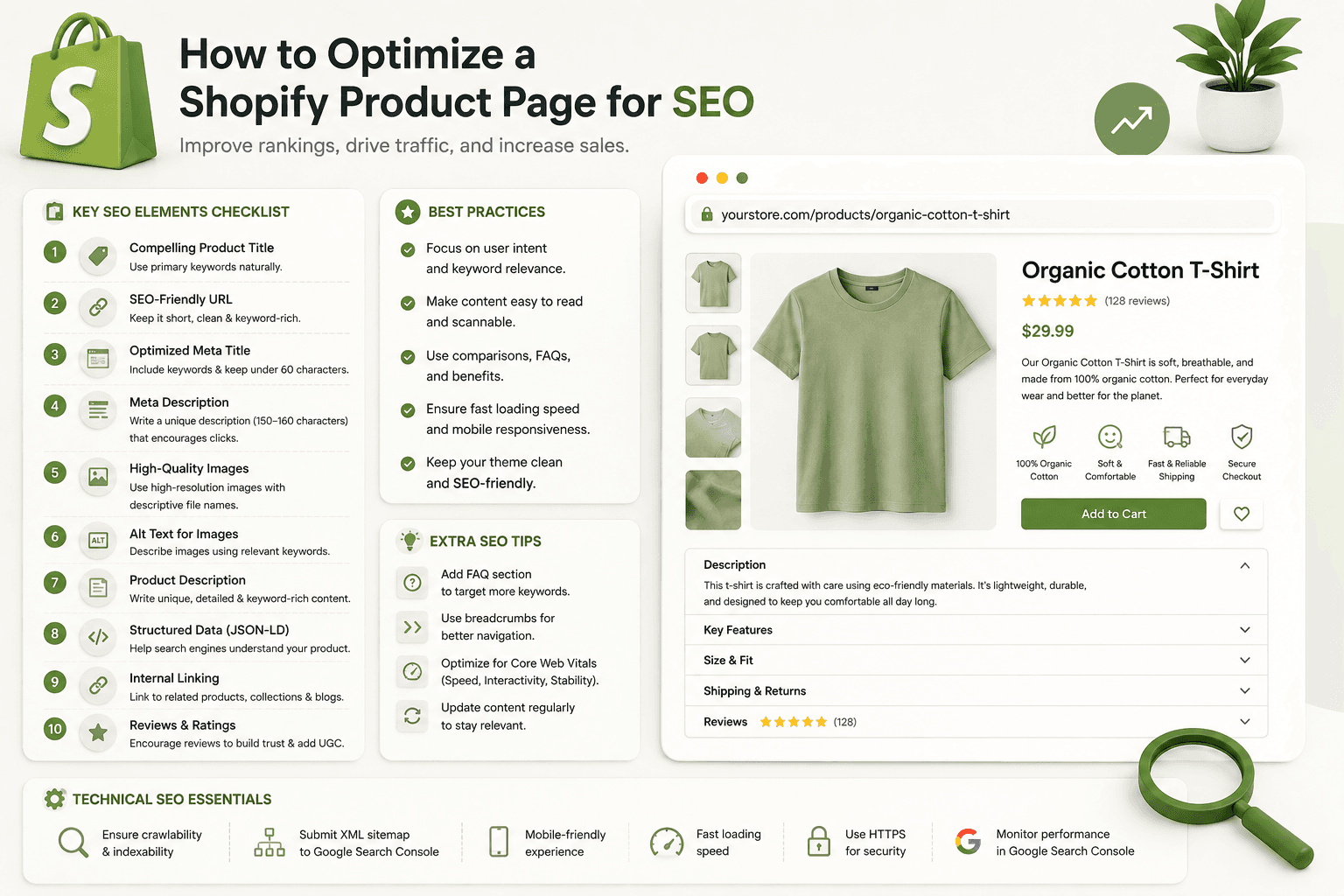
Product page SEO isn't simply about placing keywords into a title. It includes your product title, meta description, URL, product copy, images, headings, internal links, structured data, mobile experience, page speed, and overall usefulness to shoppers.
In this guide, we'll walk through how to optimize a Shopify product page for SEO without sacrificing usability or conversions.
Why Shopify Store Speed Matters
What Is Shopify Product Page SEO?Shopify product page SEO is the process of improving individual product pages so that search engines can understand and index them effectively while visitors get the information they need to make a purchase decision.
A strong product page usually combines three things:
- Search intent
- Useful product information
- A good shopping experience
SEO can bring visitors to the page, but the page still needs to answer their questions and make the product easy to evaluate.
Why Shopify Store Speed Matters
Why Product Page SEO Matters for Shopify StoresProduct pages can target highly valuable searches because people searching for specific products often have stronger purchase intent than people reading general informational content.
Consider these searches:
best running shoes for beginners

men's lightweight running shoes

black waterproof running shoes size 10
The searches become increasingly specific.
If your product genuinely matches that intent, a properly optimized product page can help search engines understand that relationship.
Why Shopify Store Speed Matters
1. Start With Search IntentBefore optimizing a product page, understand what your potential customer is actually searching for.
Don't optimize a page around a keyword simply because it has search volume.
The keyword should accurately describe the product.
For example, imagine you sell a lightweight waterproof hiking backpack.
Relevant search phrases might include:
- waterproof hiking backpack
- lightweight hiking backpack
- waterproof backpack for hiking
A phrase such as "best travel luggage" may attract searches, but it doesn't accurately match the product.
Matching search intent is more important than forcing unrelated keywords into the page.
Why Shopify Store Speed Matters
2. Optimize the Shopify Product TitleYour product title is one of the most important pieces of information on the page.
It should clearly explain what the product is.
A vague product name such as:
The Explorermay work from a branding perspective, but it doesn't provide much context by itself.
A more descriptive title could be:
The Explorer Lightweight Waterproof Hiking BackpackThis gives both visitors and search engines more information about the product.
However, don't turn your product title into a list of keywords.
Avoid titles such as:
Best Hiking Backpack Waterproof Backpack Cheap Hiking
Bag Lightweight Backpack
Write for humans first.
Why Shopify Store Speed Matters
3. Write a Unique Product DescriptionOne of the biggest ecommerce SEO mistakes is using the same manufacturer description that appears on many other websites.
Instead, create useful and original product copy.
Your description should explain:
- What the product is
- Who it is designed for
- What problem it solves
- Important features
- Key benefits
- Materials
- Dimensions or specifications
- Care instructions when relevant
- Shipping or compatibility information when useful
Why Shopify Store Speed Matters
Features vs BenefitsProduct descriptions become more useful when they explain both features and benefits.
A feature might be:
20-liter capacityA benefit explains why that matters:
20-liter capacity gives you enough room for everyday hiking
essentials without carrying an oversized pack.
The second version helps the shopper understand how the specification affects them.
Why Shopify Store Speed Matters
4. Use Keywords Naturally in the Product DescriptionYour primary topic should appear naturally in the product content, but don't repeat the exact keyword in every paragraph.
If your product is a:
waterproof hiking backpackrelated language might naturally include:
- hiking backpack
- water-resistant material
- outdoor backpack
- hiking gear
- adjustable shoulder straps
- backpack capacity
Use terminology because it helps describe the product, not simply because you want to increase keyword frequency.
Why Shopify Store Speed Matters
5. Optimize the SEO TitleThe page title shown to search engines doesn't always need to be identical to the visible product name.
A useful SEO title should accurately describe the page and give searchers a reason to consider clicking it.
For example:
Explorer Waterproof Hiking Backpack | Brand NameKeep the most important descriptive information clear rather than filling the title with repeated keywords.
Why Shopify Store Speed Matters
6. Write a Useful Meta DescriptionThe meta description gives you an opportunity to summarize the product for someone viewing a search result.
A weak description might be:
Buy our backpack. Great quality and best price.A more useful description could be:
Shop the Explorer lightweight waterproof hiking backpack
with adjustable straps, multiple storage compartments and a
20L capacity for day hikes and outdoor adventures.
Keep it accurate. Don't advertise features, discounts, delivery promises, or guarantees that the product doesn't actually offer.
Why Shopify Store Speed Matters
7. Optimize the Product URLShopify product URLs commonly use the product route followed by the product handle.
For example:
/products/explorer-waterproof-hiking-backpackThis is clearer than a handle such as:
/products/item-93827-newUse a concise and descriptive handle where practical.
Avoid changing established URLs without a reason. If a URL must change, make sure the old URL is handled appropriately so visitors and search engines aren't sent to a dead page.
Why Shopify Store Speed Matters
8. Use One Clear Primary HeadingYour product page should have a clear main heading that identifies the product.
In many Shopify themes, the product title serves as the primary heading.
<h1>
    Explorer Waterproof Hiking Backpack
</h1>
Additional sections can then use meaningful subheadings.
<h2>Product Features</h2>

<h2>Materials and Care</h2>

<h2>Frequently Asked Questions</h2>
Use headings to organize the page logically rather than choosing heading levels only because of their default font size.
Why Shopify Store Speed Matters
9. Optimize Product ImagesProduct images influence both the shopping experience and page performance.
Use clear, high-quality images that help shoppers understand the product.
Depending on the product, useful images might include:
- Front view
- Back view
- Side view
- Close-up details
- Product in use
- Size or scale reference
- Important features
Why Shopify Store Speed Matters
10. Write Descriptive Image Alt TextAlt text helps describe an image when the image can't be seen and is important for accessibility.
It can also provide search engines with useful context about the image.
Avoid:
image1Or keyword stuffing such as:
best backpack hiking backpack waterproof backpack buy
backpack cheap backpack
A better description might be:
Black Explorer waterproof hiking backpack viewed from the frontDescribe what is actually shown in the image.
Why Shopify Store Speed Matters
11. Don't Upload Unnecessarily Large ImagesHigh-resolution product photography is useful, but serving images much larger than the visitor's device needs can increase page weight.
Shopify themes can generate appropriately sized image URLs, so developers should take advantage of responsive image techniques.
For example, Liquid can generate image URLs at specified widths:
{% raw %}{{
    product.featured_image
    | image_url: width: 1200
    | image_tag:
        loading: 'lazy',
        alt: product.featured_image.alt
}}{% endraw %}
Your exact implementation should match the theme and the role of the image on the page.
Why Shopify Store Speed Matters
12. Be Careful With Lazy Loading Above-the-Fold ImagesLazy loading can be useful for images further down the page, but blindly lazy-loading every image isn't always a good strategy.
The primary product image is often visible immediately when the page loads and may contribute to the page's Largest Contentful Paint.
Developers should consider which images are immediately important and which can safely be loaded later.
Why Shopify Store Speed Matters
13. Improve Product Page SpeedProduct pages often become some of the heaviest pages on Shopify stores.
They may contain:
- Large product images
- Videos
- Review widgets
- Recommendation apps
- Upsell apps
- Analytics scripts
- Variant JavaScript
- Third-party tracking
Each feature may be useful, but together they can significantly increase the amount of work required to render and interact with the page.
Review what is actually necessary.
Why Shopify Store Speed Matters
14. Pay Attention to Core Web VitalsWhen evaluating Shopify product page performance, pay particular attention to user experience metrics such as:
- Largest Contentful Paint (LCP)
- Interaction to Next Paint (INP)
- Cumulative Layout Shift (CLS)
Common product page problems include a large hero image loading slowly, scripts delaying interaction, or page elements moving after widgets load.
Why Shopify Store Speed Matters
15. Avoid Layout ShiftsImagine a shopper is about to click the Add to Cart button and a review widget suddenly loads above it, moving the button.
That's a poor user experience.
Where practical, reserve space for media and dynamically loaded components so that the layout remains stable.
Why Shopify Store Speed Matters
16. Add Useful Product SpecificationsDon't make shoppers search elsewhere for basic information about the product.
Depending on the product, specifications may include:
- Dimensions
- Weight
- Material
- Capacity
- Compatibility
- Color options
- Size options
- Care instructions
Useful specifications improve the completeness of the page and help visitors make better purchasing decisions.
Why Shopify Store Speed Matters
17. Use Shopify Metafields for Structured Product InformationShopify metafields can help store additional product information that doesn't fit cleanly into the standard product fields.
For example:
Material: Recycled Nylon

Capacity: 20L

Weight: 650g

Water Resistance: Yes
Developers can then render this information consistently across product pages.
This is often better than manually formatting different specification tables inside every product description.
Why Shopify Store Speed Matters
18. Add Helpful Internal LinksProduct pages shouldn't always exist as isolated pages.
Link products to relevant:
- Collections
- Related products
- Buying guides
- Blog articles
- Size guides
- Care guides
For example, a hiking backpack product page could link to a guide about choosing the right backpack size.
The guide can also link back to relevant products.
Blog Guide
    ↓
Relevant Collection
    ↓
Product Page

Product Page
    ↓
Useful Guide
This creates a more connected site structure and gives visitors useful paths to continue exploring.
Why Shopify Store Speed Matters
19. Use Descriptive Anchor TextAvoid making every internal link say:
Click hereWhen natural, use anchor text that explains the destination.
For example:
View our lightweight hiking backpacksThe goal is clarity, not keyword stuffing.
Why Shopify Store Speed Matters
20. Add Product Structured Data CorrectlyStructured data can help search engines understand important product information.
Depending on the implementation and available product data, this may include information such as:
- Product name
- Image
- Description
- Brand
- Price
- Currency
- Availability
- Reviews or ratings when eligible and genuinely present
Many Shopify themes already output product structured data, so don't automatically add a second implementation.
Inspect the existing theme first.
Why Shopify Store Speed Matters
21. Avoid Duplicate Product SchemaDevelopers sometimes install an SEO app or add custom JSON-LD without checking whether the theme already generates product structured data.
You may end up with:
Theme Product Schema
        +
SEO App Product Schema
        +
Custom Product Schema
Instead of assuming more schema is better, inspect the page and understand which implementation should be responsible for the structured data.
Why Shopify Store Speed Matters
22. Keep Structured Data Consistent With the Visible PageDon't use structured data to describe information that isn't actually supported by the product page.
For example, don't mark up fake ratings or reviews simply because you want stars to appear in search results.
Structured data should accurately represent the content and product information available on the page.
Why Shopify Store Speed Matters
23. Handle Product Variants CarefullyShopify products frequently have variants such as:
- Size
- Color
- Material
- Style
For example:
Running Shoe

├── Black / Size 8
├── Black / Size 9
├── Blue / Size 8
└── Blue / Size 9
Don't automatically create separate indexable product pages for every tiny variation unless there is a clear search and user experience reason for doing so.
Think about whether a variant is simply an option of the same product or genuinely represents a distinct search destination.
Why Shopify Store Speed Matters
24. Watch for Duplicate ContentEcommerce stores naturally contain repeated information.
Problems become more significant when many product pages use almost identical descriptions with only the product name changed.
Avoid templates like:
Buy [PRODUCT NAME] from our store.
Our [PRODUCT NAME] is high quality.
Order [PRODUCT NAME] today.
Instead, provide meaningful information specific to each product.
Why Shopify Store Speed Matters
25. Use Canonical URLs CorrectlyShopify stores can sometimes expose products through different navigational paths or URL parameters.
Canonical information helps search engines understand the preferred version of a page.
Most modern Shopify themes handle canonical tags, but developers should verify the implementation before adding custom canonical logic.
Incorrect canonical tags can create bigger SEO problems than the issue they were intended to solve.
Why Shopify Store Speed Matters
26. Don't Hide Important Product InformationTabs and accordions can improve product page organization, especially on mobile.
But don't use interaction patterns that make important information unnecessarily difficult for visitors to access.
Organize information around what customers need.
A product page might contain:
Product Description

Features

Specifications

Shipping Information

Care Instructions

FAQ
The exact structure should depend on the product.
Why Shopify Store Speed Matters
27. Add Product FAQs When They Are Actually UsefulFAQs can help address questions that might otherwise prevent a purchase.
For a backpack, useful questions might include:
- Is the backpack waterproof?
- What size laptop fits inside?
- What is the backpack capacity?
- Can it be used as cabin luggage?
- How should it be cleaned?
Don't add generic FAQs simply to make the page longer.
Each answer should solve a real customer question.
Why Shopify Store Speed Matters
28. Add Reviews CarefullyGenuine customer reviews can help shoppers evaluate a product.
Reviews may provide:
- Real-world product experiences
- Answers to common concerns
- Additional product context
- Trust signals for shoppers
However, review widgets can also add JavaScript and network requests to the page.
Evaluate both the user benefit and performance cost of the implementation you choose.
Why Shopify Store Speed Matters
29. Improve Your Related Products SectionRelated products can improve product discovery and internal navigation.
Instead of displaying completely random products, prioritize items that make sense for the current shopper.
For example:
Hiking Backpack
    ↓
Water Bottle
Rain Cover
Hiking Accessories
Relevance is more useful than simply showing more products.
Why Shopify Store Speed Matters
30. Optimize Product Pages for MobileProduct page SEO and mobile usability are closely connected because a page that is difficult to use on a phone creates a poor experience regardless of how well its metadata is optimized.
On mobile, check:
- Product image size
- Title wrapping
- Price visibility
- Variant selectors
- Add to Cart button
- Sticky cart behavior
- Description readability
- Accordions
- Reviews
- Related products
Also check for horizontal overflow and elements that are difficult to tap.
Why Shopify Store Speed Matters
31. Make the Add to Cart Experience FastSEO can bring a shopper to your product page, but a broken purchase experience can waste that traffic.
Test:
- Variant selection
- Quantity changes
- Add to Cart
- Cart drawer
- Cart page
- Out-of-stock behavior
- Error states
Product page optimization should consider the entire user journey, not just search engine metadata.
Why Shopify Store Speed Matters
32. Don't Let Apps Overload the Product PageShopify makes it easy to install apps, which can lead to product pages containing many different widgets.
For example:
Reviews
+
Wishlist
+
Upsell
+
Countdown Timer
+
Chat
+
Recommendations
+
Popup
+
Analytics
Each feature might seem useful individually, but together they can create visual clutter and additional page weight.
Periodically review whether every app and widget still provides enough value to justify its presence.
Why Shopify Store Speed Matters
33. Create Supporting Blog ContentProduct pages usually target commercial or transactional searches. Blog content can target informational searches earlier in the buying journey.
For example:
Blog:
How to Choose a Hiking Backpack
        ↓
Collection:
Hiking Backpacks
        ↓
Product:
Explorer 20L Hiking Backpack
This allows your content strategy to support your commercial pages rather than treating the blog and store as unrelated parts of the website.
Why Shopify Store Speed Matters
34. Keep Out-of-Stock Product Pages UsefulDon't automatically remove a product URL the moment an item becomes temporarily unavailable.
If the product is expected to return, keeping the page available with accurate availability information may provide a better experience.
You can also offer relevant alternatives where appropriate.
If a product is permanently discontinued, decide what should happen based on whether the URL still has useful traffic, links, or a suitable replacement.
Why Shopify Store Speed Matters
35. Build Trust Into the Product PageSearch traffic is valuable only if visitors trust the store enough to buy.
Make important information easy to find, such as:
- Shipping information
- Return policy
- Contact information
- Product availability
- Accurate pricing
- Product specifications
Avoid fake urgency, misleading claims, or fabricated reviews.
Why Shopify Store Speed Matters
Shopify Product Page SEO ExampleLet's compare a poorly optimized product page with a stronger one.
Before Optimization
Title:
Explorer

URL:
/products/explorer-123

Description:
High quality backpack. Buy now.

Image Alt:
image1.jpg

Meta Description:
Shop now.
After Optimization
Title:
Explorer 20L Waterproof Hiking Backpack

URL:
/products/explorer-waterproof-hiking-backpack

Description:
Original product copy covering materials, capacity,
features, use cases and care information.

Image Alt:
Black Explorer 20L waterproof hiking backpack

Meta Description:
A useful summary describing the actual product,
its important features and intended use.
Notice that the optimized version isn't simply longer.
It is more descriptive and useful.
Why Shopify Store Speed Matters
Technical Shopify Product Page SEO ChecklistDevelopers should also review the technical implementation.
- Confirm the product page is indexable when appropriate.
- Check the canonical URL.
- Verify the primary heading.
- Inspect product structured data.
- Check for duplicate schema implementations.
- Review image loading behavior.
- Check responsive images.
- Test mobile layout.
- Review JavaScript errors.
- Check page performance.
- Review internal links.
- Check broken links.
- Test variant functionality.
- Test Add to Cart functionality.
- Review third-party scripts.
Why Shopify Store Speed Matters
Content Shopify Product Page SEO Checklist- Use a clear product title.
- Write an original product description.
- Match the page to relevant search intent.
- Explain features and benefits.
- Include important specifications.
- Write useful image alt text.
- Create an accurate SEO title.
- Write an informative meta description.
- Add useful FAQs when appropriate.
- Link to relevant collections and content.
- Provide accurate availability information.
- Make shipping and returns information accessible.
Why Shopify Store Speed Matters
Common Shopify Product Page SEO Mistakes1. Copying Manufacturer Descriptions
Create original product content that reflects the actual product and your customers' needs.
2. Keyword Stuffing
Repeating a keyword unnaturally doesn't make a product page more useful.
3. Using Vague Product Titles
A branded name can be useful, but adding accurate descriptive context often makes the product easier to understand.
4. Ignoring Image Alt Text
Use meaningful descriptions for informative product images.
5. Ignoring Page Speed
Large media files, apps, and unnecessary JavaScript can create a poor product page experience.
6. Adding Duplicate Structured Data
Check what the theme and apps already generate before adding custom schema.
7. Creating Thin Product Pages
A product page containing only a title, price, image, and one sentence may not answer enough customer questions.
8. Writing Content Just to Increase Word Count
More words don't automatically mean better SEO.
Include information because it helps someone understand or evaluate the product.
9. Ignoring Mobile UX
Always test the actual purchasing experience on smaller screens.
10. Changing URLs Unnecessarily
Don't repeatedly change established product URLs simply to insert a slightly different keyword.
Why Shopify Store Speed Matters
How Long Should a Shopify Product Description Be?There is no universal word count that every product page should reach.
A simple product may need relatively little explanation, while a technical or expensive product may require much more detail.
Instead of asking:
"How many words does Google want?"
ask:
"Does this page give a potential customer enough information to understand and evaluate this product?"
That is a much more useful standard.
Why Shopify Store Speed Matters
How Shopify Developers Can Improve Product Page SEOSEO isn't only the responsibility of the person writing the product description.
Developers influence important technical aspects of the page.
A Shopify developer can improve:
- Semantic HTML
- Heading structure
- Responsive images
- Image loading
- Structured data
- Page performance
- Mobile responsiveness
- Internal linking components
- Product recommendations
- JavaScript performance
This is why good Shopify SEO often requires cooperation between content, development, merchandising, and marketing.
Why Shopify Store Speed Matters
Frequently Asked QuestionsHow do I optimize a Shopify product page for SEO?
Start with a clear product title, original description, descriptive URL, useful metadata, optimized images, logical headings, internal links, accurate structured data, good mobile usability, and strong page performance. The page should satisfy the searcher's intent while helping them evaluate the product.
Are Shopify product pages good for SEO?
Shopify provides the foundation needed to create search-friendly product pages, but the final SEO quality depends on your content, theme implementation, site architecture, performance, internal linking, and other optimization decisions.
How long should a Shopify product description be for SEO?
There is no required SEO word count. The description should be long enough to answer important customer questions and explain the product accurately without adding unnecessary filler.
Should every Shopify product have a unique description?
When products are meaningfully different, writing unique and useful descriptions is generally preferable to copying the same generic text across many product pages.
Do Shopify product images affect SEO?
Images can affect accessibility, user experience, image discovery, and page performance. Use useful product photography, descriptive alt text where appropriate, responsive sizing, and an efficient loading strategy.
Should I add schema markup to Shopify product pages?
Product structured data can help search engines understand product information, but many Shopify themes already generate it. Inspect your existing implementation before adding additional schema.
Does page speed affect Shopify product page SEO?
Page performance contributes to the overall user experience and should be part of your SEO work. Product pages should be reviewed for oversized images, unnecessary JavaScript, third-party scripts, layout shifts, and slow interactions.
Should I use keywords in Shopify product titles?
Use descriptive words that accurately identify the product and match relevant search intent. Avoid turning product titles into unnatural lists of repeated keywords.
Why Shopify Store Speed Matters
Final Shopify Product Page SEO Checklist- Identify the product's real search intent.
- Create a clear and descriptive product title.
- Write an original product description.
- Explain both features and benefits.
- Include useful specifications.
- Create a concise, descriptive product handle.
- Optimize the SEO title.
- Write an accurate meta description.
- Use logical heading structure.
- Optimize product images.
- Write descriptive alt text.
- Use responsive image sizes.
- Review image loading behavior.
- Improve page speed.
- Check Core Web Vitals.
- Reduce unnecessary layout shifts.
- Add useful internal links.
- Link to supporting blog content.
- Check product structured data.
- Avoid duplicate schema implementations.
- Review canonical URLs.
- Handle variants carefully.
- Add useful FAQs where appropriate.
- Optimize the mobile experience.
- Test the purchasing experience.
- Review third-party apps and scripts.
- Keep important product information accurate.
Why Shopify Store Speed Matters
Final ThoughtsShopify product page SEO isn't about finding one trick that pushes a product to the top of Google.
Strong product pages combine useful content, clear site structure, sound technical implementation, fast performance, and a good shopping experience.
Start by understanding what potential customers are actually looking for. Then make sure your product title, description, images, specifications, metadata, and page structure answer that intent clearly.
From the development side, pay attention to responsive images, structured data, canonical URLs, mobile usability, JavaScript, third-party apps, and Core Web Vitals.
Most importantly, avoid optimizing only for search engines.
The visitor who lands on the page still needs to understand the product, trust the information, select the right variant, and complete their purchase without unnecessary friction.
When SEO and user experience work together, your Shopify product pages have a much stronger foundation for attracting relevant organic traffic and converting that traffic into customers.