Shopify Online Store 2.0 changed the way Shopify themes are structured, customized, and maintained. For merchants, it introduced more flexibility through sections, blocks, JSON templates, app blocks, and dynamic sources. For Shopify developers, it created a more modular approach to building storefronts that can be customized directly through the Shopify theme editor.
If you are learningShopify theme development, working with Liquid, building custom Shopify stores, or maintaining an existing Shopify Online Store 2.0 theme, understanding its architecture is essential.
Older Shopify themes often relied heavily on Liquid templates and hard-coded section structures. Modern Shopify themes are designed around reusable sections and JSON templates, allowing merchants to change page layouts without requiring developers to create a separate template for every variation.
In this guide, we will explore Shopify Online Store 2.0 from a developer and store-owner perspective. We will cover JSON templates, Liquid templates, sections, blocks, section groups, app blocks, dynamic sources, metafields, theme schema, presets, snippets, assets, Shopify theme architecture, performance considerations, and practical development patterns.
What Is Shopify Online Store 2.0?
Shopify Online Store 2.0 is Shopify's modern theme architecture designed to provide greater flexibility to merchants and developers.
One of the most important changes was the expansion of the theme editor's section-based customization capabilities.
In a traditional theme architecture, many pages had a fixed structure defined by Liquid templates. Developers could create different templates, but merchants had fewer options for rearranging page components.
Online Store 2.0 introduced JSON templates that describe which sections should appear on a page and how those sections should be configured.
This makes the storefront much more modular.
Online Store 2.0 is fundamentally about modular Shopify theme architecture. JSON templates define page composition, sections provide reusable components, blocks provide configurable content units, and the Shopify theme editor allows merchants to control the storefront without editing code for every layout change.
Why Shopify Online Store 2.0 Matters
Online Store 2.0 matters because Shopify stores are rarely static websites.
A typical store may need:
- Custom product pages.
- Flexible collection pages.
- Landing pages.
- Promotional sections.
- Product recommendations.
- Custom banners.
- Testimonials.
- FAQ sections.
- Image galleries.
- Video sections.
- Custom content blocks.
- App integrations.
- Product metafields.
Online Store 2.0 provides a better architecture for building these experiences as reusable components rather than creating isolated hard-coded pages.
Online Store 2.0 vs Older Shopify Themes
Understanding the difference between older Shopify themes and Online Store 2.0 is important when working on an existing Shopify project.
Older themes commonly used Liquid templates such as:
product.liquid


collection.liquid
page.liquid
index.liquid
Modern themes use JSON templates such as:
product.json


collection.json
page.json
index.json
The JSON template does not contain the complete HTML structure of the page. Instead, it defines which sections should be rendered and how those sections are configured.
This separation between page composition and component implementation is one of the most important concepts in Online Store 2.0.
What Are Shopify JSON Templates?
Shopify JSON templates are configuration files that define the sections used by a particular page template.
For example, a simplified product JSON template may look like:
{


"sections": {
    "main": {
        "type": "main-product",
            "settings": { }
    },
    "related": {
        "type": "related-products",
            "settings": { }
    }
},
"order": [
    "main",
    "related"
]
}
The important thing to understand is that the JSON file is not directly responsible for rendering the product page HTML.
Instead, it references sections such as:
main-product


related - products
Shopify then loads those section files from the theme.
How JSON Templates Work
A JSON template generally contains a collection of sections and an order in which those sections should be rendered.
The structure can conceptually be understood as:
JSON Template
↓


Sections
↓
Blocks
↓
Liquid + HTML
↓
Rendered Storefront
This architecture allows the Shopify theme editor to manipulate page composition without requiring developers to manually rewrite the page template.
Shopify Sections
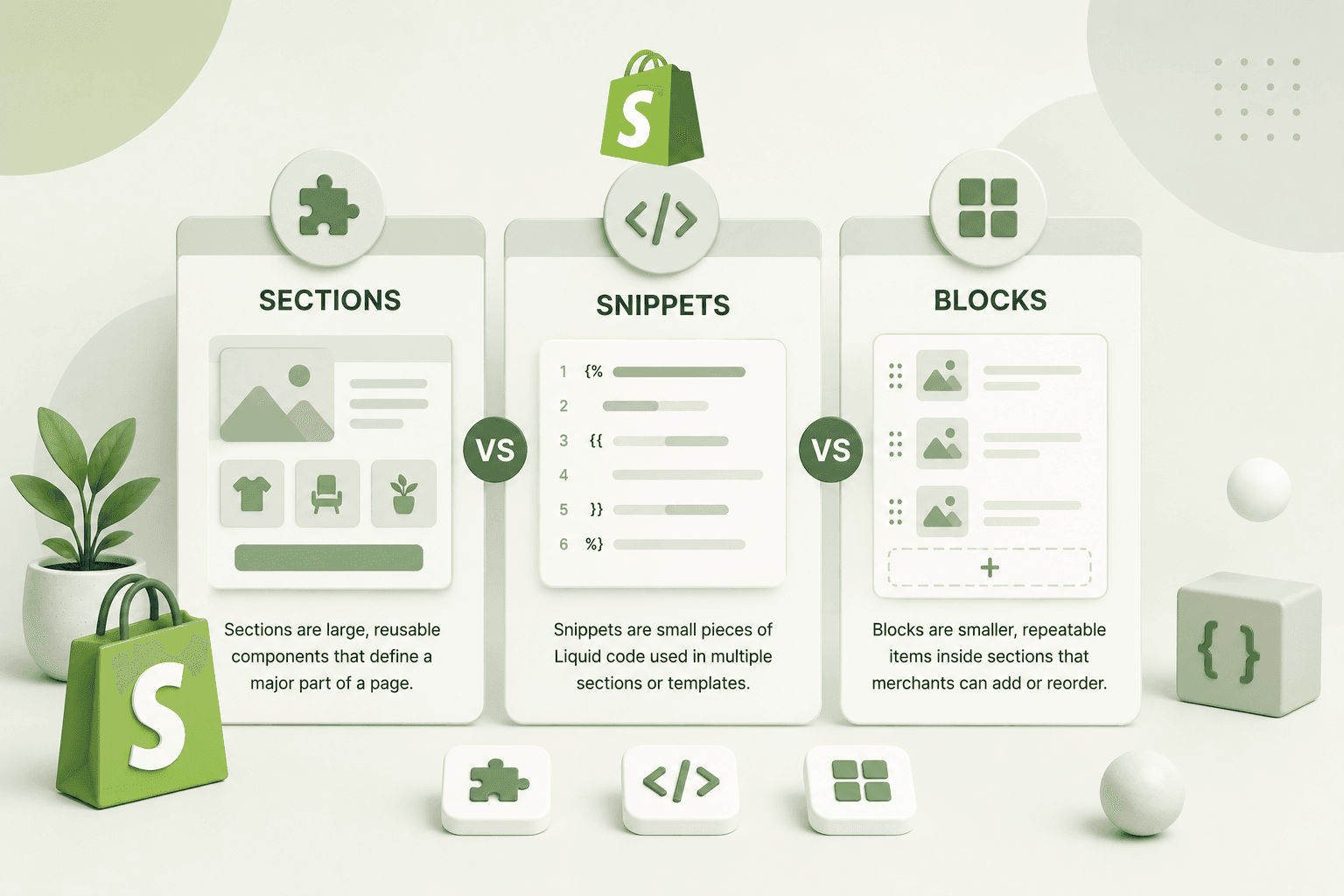
Sections are reusable components that form the building blocks of an Online Store 2.0 Shopify theme.
A section can represent almost any meaningful storefront component.
Examples include:
- Hero banner.
- Featured products.
- Product information.
- Image with text.
- Testimonials.
- FAQ.
- Newsletter signup.
- Collection list.
- Logo list.
- Video banner.
- Product comparison.
A section typically contains Liquid, HTML, CSS references or classes, JavaScript where required, and a schema that defines the settings available inside Shopify's theme editor.
Example Shopify Section
A basic Shopify section might look like:
<section class="custom-banner">


    < div class="page-width" >


<h2>
  {{ section.settings.heading }}
</h2>

<p>
  {{ section.settings.text }}
</p>


    {% schema %}
{
    "name": "Custom Banner",
        "settings": [
            {
                "type": "text",
                "id": "heading",
                "label": "Heading",
                "default": "Welcome to our store"
            },
            {
                "type": "textarea",
                "id": "text",
                "label": "Description"
            }
        ],
            "presets": [
                {
                    "name": "Custom Banner"
                }
            ]
}
{% endschema %}
The important part is the relationship between the Liquid code and the schema.
The Liquid code reads:
{{ section.settings.heading }}while the schema defines the heading setting that the merchant can edit.
What Is Shopify Section Schema?
Shopify section schema defines how a section behaves inside the theme editor.
The schema can define:
- Section name.
- Text settings.
- Rich text settings.
- Image pickers.
- Video settings.
- Color settings.
- URL settings.
- Product selectors.
- Collection selectors.
- Checkboxes.
- Range controls.
- Select/dropdown controls.
- Blocks.
- Presets.
A well-designed schema is one of the most important parts of professional Shopify theme development because it determines how easily a merchant can customize the section.
Shopify Section Settings
Section settings provide merchant-controlled configuration.
For example, a hero section might provide settings for:
- Heading.
- Description.
- Button text.
- Button URL.
- Desktop image.
- Mobile image.
- Text alignment.
- Background color.
- Text color.
This allows a single section to support multiple visual variations.
Shopify Blocks
Shopify blocks are smaller configurable components that can live inside a section.
For example, a product information section might contain blocks such as:
- Title.
- Price.
- Description.
- Variant picker.
- Quantity selector.
- Buy buttons.
- Custom text.
A testimonial section could contain multiple testimonial blocks.
An FAQ section could contain multiple question-and-answer blocks.
This makes sections much more flexible than hard-coded markup.
Example Shopify Blocks
A section schema might define blocks like this:
{


"blocks": [
    {
        "type": "testimonial",
        "name": "Testimonial",
        "settings": [
            {
                "type": "text",
                "id": "quote",
                "label": "Quote"
            },
            {
                "type": "text",
                "id": "author",
                "label": "Author"
            }
        ]
    }
]
}
The Liquid code can then loop through the section's blocks.
{% raw %}{% for block in section.blocks %}


{% if block.type == 'testimonial' %}

    {{ block.settings.quote }}


<span>
  {{ block.settings.author }}
</span>


{% endif %}
{% endfor %} {% endraw %}
Shopify Presets
Presets allow developers to define default configurations for sections when merchants add them through the theme editor.
Without a useful preset, a newly added section may contain no meaningful content.
A good preset provides a useful starting point.
For example:
"presets": [


{
    "name": "Hero Banner",
        "settings": {
        "heading": "Build something better",
            "text": "Create a modern storefront."
    }
}
]
Presets are particularly important when building themes intended for merchants who may not be developers.
Shopify Section Groups
Online Store 2.0 also introduced a more flexible way to manage groups of sections.
Section groups can be used for areas such as headers and footers where multiple sections may need to be organized together.
This can provide a more flexible architecture than having a single monolithic header or footer file.
For example, a footer group might contain:
- Newsletter section.
- Navigation section.
- Brand information.
- Social links.
- Payment information.
Shopify App Blocks
App blocks allow compatible Shopify apps to integrate functionality into Online Store 2.0 themes without requiring developers to manually hard-code app-specific Liquid into every theme.
This is a major improvement for merchants because app functionality can be positioned within compatible sections through the theme editor.
For example, an app might provide:
- Product reviews.
- Wishlist functionality.
- Product recommendations.
- Subscription widgets.
- Size guides.
Compatible app blocks can be added where supported by the theme architecture.
App Embeds vs App Blocks
These two concepts are related but serve different purposes.
App blocks generally provide app functionality that can be placed inside supported sections.
App embeds can be used for functionality that operates globally or outside the normal section content flow.
For example, an app embed might be appropriate for a floating widget or tracking functionality, while an app block might represent a review component placed inside a product page section.
Shopify JSON Templates and Dynamic Layouts
One of the biggest advantages of JSON templates is that merchants can create multiple layouts using the same reusable sections.
Imagine a store selling three different types of products:
- Clothing.
- Electronics.
- Furniture.
Each product type may require a different page layout.
Instead of duplicating an entire Liquid product template, you can create multiple JSON templates that use different combinations of sections.
Shopify Product JSON Templates
A product template could be:
templates/product.jsonAdditional templates could include:
templates/product.clothing.json


templates / product.electronics.json
templates / product.furniture.json
The exact naming and assignment workflow depends on the theme and Shopify admin configuration, but the core concept is that JSON templates can compose different page structures using reusable sections.
Shopify Collection JSON Templates
Collection pages can also use JSON templates.
A collection template might contain:
- Collection banner.
- Collection description.
- Product grid.
- Filters.
- Sorting.
- Promotional banner.
- FAQ.
Different collections can use different templates depending on the merchant's requirements.
Shopify Page JSON Templates
Regular Shopify pages can also benefit from JSON templates.
For example, a landing page could combine:
- Hero section.
- Feature section.
- Image-with-text section.
- Testimonials.
- FAQ.
- Call-to-action.
This makes Shopify useful for more than just standard product pages.
Shopify Homepage and index.json
The Shopify homepage commonly uses:
templates/index.jsonThis file can define the sections that appear on the homepage.
A homepage might contain:
{


"sections": {
    "hero": {
        "type": "hero-banner",
            "settings": { }
    },
    "featured": {
        "type": "featured-products",
            "settings": { }
    }
},
"order": [
    "hero",
    "featured"
]
}
The actual HTML is generated by the referenced section files.
JSON Templates vs Liquid Templates
This distinction is important for Shopify developers.
A Liquid template contains Liquid and markup that directly contributes to page rendering.
A JSON template primarily defines the page's section composition.
In Online Store 2.0, JSON templates are generally preferred for page types where flexible section-based customization is required.
However, Liquid remains fundamental to Shopify theme development because sections and snippets still rely heavily on Liquid for rendering dynamic storefront content.
Does Shopify Online Store 2.0 Replace Liquid?
No.
This is a common misunderstanding.
Online Store 2.0 does not eliminate Liquid.
Instead, it changes how Liquid is organized within the overall theme architecture.
Developers still use Liquid for:
- Product data.
- Collections.
- Cart functionality.
- Conditional rendering.
- Loops.
- Theme settings.
- Metafields.
- Dynamic content.
- Snippets.
If you want to learn more about Liquid itself, you can also read The Complete Guide to Shopify Theme Development with Liquid.
Shopify Liquid and Section Settings
One of the most common patterns in Online Store 2.0 development is connecting Liquid to section settings.
For example:
{{ section.settings.heading }}This means the section can be configured from Shopify's theme editor.
A developer can therefore create a single reusable section instead of hard-coding different content into different templates.
Shopify Metafields and Dynamic Sources
Metafields work particularly well with Online Store 2.0 because custom product or collection data can be connected to compatible theme settings.
For example, a product can have:
custom.material


custom.warranty
custom.care_instructions
custom.size_guide
A theme section can then display those values dynamically.
This creates a powerful separation between:
Store Data
↓


Metafields
↓
Theme Section
↓
Customer - Facing UI
For a deeper explanation of metafields, read Shopify Metafields Explained: Complete Guide for Store Owners & Developers.
Building Reusable Shopify Sections
A professional Shopify developer should avoid creating sections that solve only one very specific page requirement when a reusable architecture is possible.
Instead of creating:
homepage-special-banner.liquidyou might create:
hero-banner.liquidwith settings for:
- Heading.
- Description.
- Image.
- Button.
- Alignment.
- Colors.
- Spacing.
- Layout.
This allows the same component to be reused across multiple pages.
How to Design a Good Shopify Section
A good Shopify section should have a clear purpose.
Before creating a section, ask:
- What problem does this section solve?
- Should merchants be able to add multiple instances?
- Which settings should be configurable?
- Should the section support blocks?
- Should it support dynamic sources?
- Does it need mobile-specific settings?
- Can the section be reused elsewhere?
- Does it introduce unnecessary JavaScript?
These questions help prevent themes from becoming collections of highly specific components that are difficult to maintain.
Shopify Section Schema Best Practices
The schema is part of the user experience for merchants.
Good schema design should use:
- Clear setting names.
- Useful descriptions.
- Sensible defaults.
- Logical setting groups.
- Appropriate input types.
- Useful presets.
- Meaningful block names.
A merchant should be able to understand what a setting does without reading the Liquid source code.
Shopify Blocks vs Sections
A useful way to remember the difference is:
A section is a larger component. A block is a configurable item inside that component.
For example:
Testimonials Section
├── Testimonial Block
├── Testimonial Block
└── Testimonial Block
Or:
FAQ Section
├── FAQ Block
├── FAQ Block
└── FAQ Block
This architecture makes content repeatable without requiring developers to duplicate HTML.
Shopify Theme Snippets
Snippets are reusable pieces of Liquid code that can be rendered from sections, templates, or other snippets.
For example, you might create:
snippets/product-card.liquidand reuse it inside different sections.
This can prevent duplicate Liquid code and make theme maintenance easier.
However, developers should avoid creating snippets for extremely small pieces of code when doing so makes the architecture harder to understand.
Shopify Assets
The assets directory contains theme resources such as CSS, JavaScript, images, and other files used by the storefront.
A modern Shopify theme should avoid loading every JavaScript feature on every page.
Performance should be considered when designing the asset architecture.
Online Store 2.0 and Shopify Performance
Online Store 2.0 provides a better architecture, but using it does not automatically make a Shopify store fast.
Performance still depends on:
- Theme architecture.
- JavaScript usage.
- CSS size.
- Image optimization.
- Third-party apps.
- App scripts.
- Network requests.
- Font loading.
- DOM complexity.
- Server and CDN behavior.
A beautifully structured theme can still perform poorly if it loads unnecessary JavaScript and third-party scripts.
For more performance-focused Shopify development, explore the Shopify Development service.
Avoid Excessive JavaScript in Shopify Sections
One common mistake when creating custom Shopify sections is adding JavaScript to every section regardless of whether it is needed.
For example, if a simple text-and-image section does not require JavaScript, it should not load a large JavaScript library.
Interactive components should load only the functionality they actually require.
Shopify Online Store 2.0 and Mobile Performance
Mobile performance should be considered from the beginning of theme development.
Mobile visitors may have less processing power and slower network conditions than desktop users.
Important areas include:
- Responsive images.
- Lazy loading below-the-fold images.
- Efficient CSS.
- Limited JavaScript.
- Responsive typography.
- Efficient sliders.
- Minimal third-party scripts.
If your Shopify store has performance problems, you can also read How to Speed Up Your Shopify Store for Higher Conversions.
Shopify Online Store 2.0 and SEO
Online Store 2.0 can support strong technical SEO, but the architecture itself does not guarantee higher Google rankings.
A technically good Shopify theme should still provide:
- Semantic HTML.
- Logical heading hierarchy.
- Descriptive page titles.
- Useful meta descriptions.
- Canonical URLs.
- Optimized images.
- Accessible navigation.
- Internal linking.
- Fast page loading.
- Mobile-friendly layouts.
- Useful page content.
Sections should be designed around the content and user experience rather than being added simply to increase the number of components on a page.
Shopify JSON Templates and SEO-Friendly Page Structures
JSON templates make it easier to create specialized page structures while keeping reusable sections consistent.
For example, a collection landing page could contain:
- Collection heading.
- Supporting introduction.
- Featured products.
- Buying guide.
- FAQ.
- Related collections.
The content should still satisfy search intent and provide genuine value to visitors.
Shopify Theme Development Workflow
A professional Online Store 2.0 development workflow can look like this:
- Understand the store requirements.
- Plan the theme architecture.
- Identify reusable components.
- Define required sections.
- Define blocks and settings.
- Plan metafields and custom data.
- Create JSON templates.
- Build Liquid sections.
- Create reusable snippets.
- Implement responsive styling.
- Add required JavaScript.
- Test theme editor behavior.
- Test mobile layouts.
- Audit performance.
- Test SEO and accessibility.
- Deploy and monitor.
Shopify Theme Development With Shopify CLI
Shopify CLI is commonly used by developers working on modern Shopify themes.
A local development workflow allows developers to work with theme files, preview changes, and maintain the project through version control.
Using Git alongside Shopify theme development can also make collaboration and rollback easier.
Shopify Theme Architecture Example
A simplified Online Store 2.0 theme structure may look like:
theme/


├── assets /
├── config /
├── layout /
├── locales /
├── sections /
├── snippets /
├── templates /
│   ├── index.json
│   ├── product.json
│   ├── collection.json
│   └── page.json
└── README.md
The exact structure can vary depending on the theme, but understanding these directories is fundamental for Shopify theme development.
What Goes Inside the Sections Directory?
The sections directory contains reusable theme sections.
Examples include:
sections/hero-banner.liquid


sections / featured - products.liquid
sections / image -with-text.liquid
sections / testimonials.liquid
sections / faq.liquid
These sections can then be referenced by JSON templates and section groups.
What Goes Inside the Templates Directory?
The templates directory contains page templates.
In an Online Store 2.0 theme, many templates are JSON files.
Examples include:
templates/index.json


templates / product.json
templates / collection.json
templates / page.json
templates / cart.json
The templates determine which sections are used to construct the page.
When Should You Create a New Section?
Create a new section when the component represents a meaningful reusable piece of the storefront.
Examples include:
- Hero banner.
- Product carousel.
- Testimonial slider.
- FAQ.
- Image gallery.
- Brand logos.
Avoid creating a new section for every tiny text element.
Otherwise, the theme editor can become difficult for merchants to navigate.
When Should You Use a Snippet?
Use a snippet when you want to reuse Liquid markup or logic inside multiple sections or templates.
Product cards are a classic example.
{% raw %}{% render 'product-card', product: product %}{% endraw %}This allows multiple sections to share the same product card implementation.
When Should You Use a Block?
Use a block when merchants need to add multiple instances of a similar content type within a section.
Examples include:
- FAQ questions.
- Testimonials.
- Feature items.
- Product highlights.
- Logo items.
Common Shopify Online Store 2.0 Mistakes
Creating Monolithic Sections
A section containing hundreds of settings can become difficult for merchants to understand.
Break complex components into logical sections or blocks where appropriate.
Duplicating Liquid Code
If the same component appears in multiple places, consider whether it should become a reusable snippet or section.
Ignoring Mobile Layouts
A section that looks excellent on desktop may fail on mobile.
Test every configurable layout at multiple viewport sizes.
Adding Too Much JavaScript
Not every visual effect requires a JavaScript library.
Use CSS where appropriate and keep interactive JavaScript focused.
Poor Schema Design
A technically functional section can still provide a poor merchant experience if the settings are confusing.
Hard-Coding Content
If merchants need to update content regularly, provide appropriate theme settings or connect the section to Shopify data sources.
Online Store 2.0 for Shopify Store Owners
Store owners do not need to understand Liquid or JSON to benefit from Online Store 2.0.
The main advantage is that a properly developed theme gives merchants more control over their storefront.
Once developers create flexible sections and blocks, merchants can often:
- Rearrange content.
- Change images.
- Update headings.
- Add testimonials.
- Change promotional banners.
- Configure product sections.
- Build landing pages.
This reduces dependency on developers for everyday content changes.
Online Store 2.0 for Shopify Developers
For developers, the architecture provides a more scalable way to create reusable Shopify themes.
Instead of building every page as a unique template, developers can create a component system consisting of:
Sections


    +
    Blocks
    +
    Snippets
    +
    JSON Templates
        +
        Metafields
        +
        Theme Settings
This architecture makes large Shopify projects easier to extend and maintain.
Shopify Online Store 2.0 and Custom Shopify Development
Online Store 2.0 is particularly valuable when a merchant needs a storefront that looks different from the standard theme experience.
A developer can create custom sections while preserving the flexibility of the Shopify theme editor.
This is often a better long-term solution than building a completely hard-coded storefront that requires developer intervention for every content update.
If your store needs a custom Shopify theme, custom Liquid sections, Online Store 2.0 architecture, or performance improvements, explore the Shopify Development service.
Online Store 2.0 and Headless Shopify
Online Store 2.0 and headless Shopify are different approaches.
Online Store 2.0 keeps Shopify's storefront rendering architecture and theme system while providing modern customization capabilities.
A headless Shopify implementation separates the frontend from Shopify's traditional theme rendering system.
For example:
Shopify


↓
Commerce Backend

Next.js
↓
Custom Frontend
Headless Shopify can provide greater frontend control, but it also introduces additional development complexity.
Read Headless Shopify: Why Use Next.js for Your Storefront if you want to understand when a headless architecture makes sense.
Online Store 2.0 vs Headless Shopify
For many businesses, Online Store 2.0 is the better choice because it provides a strong balance between flexibility, Shopify integration, development cost, and merchant usability.
Headless Shopify may make more sense when the business requires highly customized frontend experiences, complex application behavior, or a frontend architecture that cannot be achieved efficiently through Shopify themes.
The right choice depends on the project's business and technical requirements.
How to Build a Scalable Shopify Theme
A scalable Shopify theme should be designed with future changes in mind.
Think beyond the current homepage.
Consider:
- Future product categories.
- New collections.
- Marketing campaigns.
- Landing pages.
- New content blocks.
- Additional app integrations.
- International markets.
- Mobile experiences.
A flexible section architecture can make future changes significantly easier.
Shopify Online Store 2.0 Development Checklist
- Use JSON templates where appropriate.
- Build reusable Shopify sections.
- Use blocks for repeatable content.
- Create meaningful section schemas.
- Provide useful presets.
- Use snippets for reusable Liquid markup.
- Use metafields for structured custom data.
- Use dynamic sources where appropriate.
- Support compatible app blocks.
- Keep JavaScript minimal.
- Optimize images.
- Test mobile layouts.
- Maintain semantic HTML.
- Keep accessibility in mind.
- Test theme editor usability.
- Test multiple products and collections.
- Audit Core Web Vitals.
- Keep theme code organized.
- Use version control during development.
- Document custom architecture.
Final Thoughts
Shopify Online Store 2.0 is one of the most important concepts for modern Shopify theme development.
The architecture provides a flexible combination of JSON templates, Liquid sections, blocks, snippets, section groups, app blocks, dynamic sources, theme settings, and Shopify metafields.
For store owners, this means more control over the storefront and less dependence on developers for everyday changes.
For Shopify developers, it provides a cleaner and more modular architecture for creating scalable custom themes.
The most important thing is not simply knowing how to create a JSON template or write a Liquid section. Professional Shopify development requires understanding how these pieces work together.
A strong Online Store 2.0 theme should be flexible, maintainable, responsive, accessible, SEO-friendly, and performance-focused.
If your Shopify store needs custom sections, JSON templates, Liquid development, metafields, app integrations, responsive design, or performance optimization, explore the Shopify Development service by Built by Saurav.
For projects requiring a custom React or Next.js frontend, explore the React & Next.js Development service.
If you're planning a new Shopify store or want to improve an existing theme, contact Saurav to discuss your requirements.
Frequently Asked Questions
What is Shopify Online Store 2.0?
Shopify Online Store 2.0 is Shopify's modern theme architecture that provides greater flexibility through JSON templates, reusable sections, blocks, app blocks, section groups, and dynamic sources.
What is a Shopify JSON template?
A Shopify JSON template defines the sections that should appear on a particular page and the order in which those sections should be rendered. The sections contain the Liquid and markup responsible for rendering the actual content.
What is the difference between Shopify JSON and Liquid templates?
JSON templates primarily define page composition, while Liquid templates contain rendering logic and markup. Online Store 2.0 uses JSON templates extensively for flexible section-based page layouts while Liquid remains fundamental to theme development.
What are Shopify sections?
Shopify sections are reusable storefront components that can contain Liquid, HTML, settings, and blocks. They can be added and configured through the Shopify theme editor when supported by the theme architecture.
What are Shopify blocks?
Blocks are configurable components inside sections. They are useful for repeatable content such as testimonials, FAQs, features, logos, or other items that merchants may want to add multiple times.
What is Shopify section schema?
Section schema defines the settings, blocks, presets, and other configuration available for a section inside the Shopify theme editor.
Can I create custom Shopify sections?
Yes. Developers can create custom Shopify sections using Liquid and Shopify section schema. Custom sections can be designed for specific business requirements while still allowing merchants to manage content through the theme editor.
Can Shopify Online Store 2.0 use metafields?
Yes. Metafields work particularly well with Online Store 2.0 because structured custom data can be connected to compatible theme settings and dynamic sources.
What are Shopify dynamic sources?
Dynamic sources allow compatible theme settings to use data from Shopify resources such as products, collections, and metafields. They help create flexible sections that automatically display context-specific information.
Does Online Store 2.0 replace Shopify Liquid?
No. Liquid remains a fundamental part of Shopify theme development. Online Store 2.0 changes the theme architecture around Liquid by providing JSON templates, reusable sections, blocks, and more flexible theme customization.
What is the Shopify sections directory?
The sections directory contains reusable Shopify section files. These files generally contain Liquid markup and a schema that defines how the section can be configured through the Shopify theme editor.
What is the Shopify templates directory?
The templates directory contains page templates. In modern Online Store 2.0 themes, many page templates use JSON files that define the sections used to construct the page.
Can merchants rearrange sections in Shopify Online Store 2.0?
Yes, when the theme and page type support section-based customization, merchants can use the Shopify theme editor to add, remove, configure, and rearrange supported sections.
What are Shopify app blocks?
App blocks allow compatible Shopify apps to provide functionality that merchants can place inside supported theme sections through the theme editor.
Is Shopify Online Store 2.0 better for SEO?
Online Store 2.0 provides a modern theme architecture that can support strong technical SEO, but using Online Store 2.0 alone does not guarantee higher rankings. SEO still depends on content quality, search intent, technical implementation, performance, accessibility, internal linking, authority, and many other factors.
Is Shopify Online Store 2.0 faster?
The architecture can support performant themes, but speed depends on how the theme is developed. Large JavaScript bundles, third-party apps, unoptimized images, excessive DOM complexity, and inefficient code can still make an Online Store 2.0 store slow.
Should I use a Shopify theme or headless Shopify?
For many businesses, a well-developed Online Store 2.0 theme provides an excellent combination of flexibility, performance, Shopify integration, and merchant usability. Headless Shopify can be appropriate when a project requires significantly greater frontend control or a custom application architecture.
Can I hire a Shopify developer for Online Store 2.0 development?
Yes. A Shopify developer can help with custom Online Store 2.0 themes, Liquid development, JSON templates, custom sections, blocks, metafields, app integrations, performance optimization, responsive design, and Shopify API integrations. You can contact Saurav to discuss a custom Shopify development project.